Basslane
Key Features
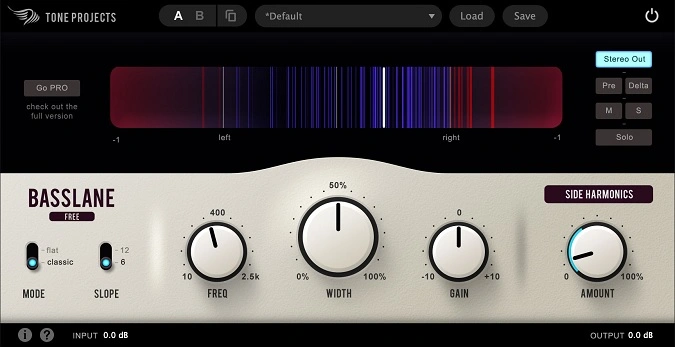
- Side Harmonics control injects musically related upper harmonics into the side channel for perceived bass width without sub-frequency stereo problems
- Two response modes (Classic and Flat) with selectable 6 dB/Oct or 12 dB/Oct filter slopes for flexible narrowing behavior
- Continuously variable Frequency control spanning 10 Hz to 2.5 kHz covers everything from deep sub tightening to lower-midrange management
- Stereo balance and correlation metering built into the interface for real-time visual feedback on mono compatibility
- Flexible monitoring modes (Delta, Mid, Side, filter solo) let you audition exactly what the processing affects
- Native Apple Silicon support with a modernized GUI and low CPU footprint
- Works as the last plugin in an effects chain, letting you stack creative stereo effects while keeping the low end anchored
Description
Basslane by Tone Projects is a dedicated low-frequency stereo width controller built to keep the bottom end of your mix tight and mono-compatible. It narrows the stereo spread of frequencies below a user-defined threshold, preventing the muddiness that wide kick drums, synth basses, and reverb tails introduce when low-end energy drifts across the stereo field.
The plugin operates with two response modes, Classic and Flat, paired with selectable 6 dB/Oct or 12 dB/Oct filter slopes for precise control over how aggressively the narrowing is applied. A continuously variable Frequency control sweeps from 10 Hz up to 2.5 kHz, while the Width knob adjusts the result anywhere from full mono to untouched stereo.
What sets Basslane apart from a simple mid/side balance is its Side Harmonics control, a feature borrowed from the paid Basslane Pro. It generates upper harmonics derived from the mono bass content and places them in the side channel, adding perceived width and definition without reintroducing problematic stereo energy in the sub frequencies.
The interface includes stereo balance and correlation metering alongside flexible monitoring modes including Delta, Mid, Side, and filter solo, making it straightforward to audition exactly what the processing is doing. Originally released years ago as a Windows-only utility, the current version adds macOS and Apple Silicon native support with a modernized GUI.
Basslane runs as a VST3, AU, or AAX plugin on macOS 10.7 or higher (Intel and Apple Silicon) and Windows 7 or higher, in both 32-bit and 64-bit formats on Windows.
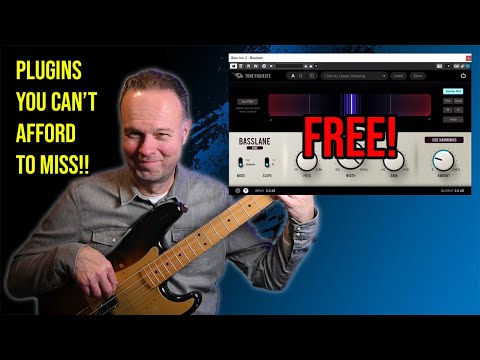
Video Preview

Tips
- Use Basslane at the end of your effects chain to keep the low-end tight while experimenting with stereo effects.
- Adjust the Side Harmonics control to add definition and width to your bass without causing muddiness.
- Utilize the flexible monitoring options to fine-tune the stereo width and ensure clarity in your mix.
- Experiment with the Frequency control to find the best range for narrowing the stereo width of low frequencies.
- Use the Slope switch to adjust the filter steepness and achieve the desired effect on your bass.
- Apply the Width knob to balance between mono and stereo, depending on the needs of your mix.
- Take advantage of the Gain knob to control the output level and maintain a balanced mix.
Frequently Asked Questions
What is the difference between Basslane and Basslane Pro?
Basslane is a streamlined version that handles stereo width narrowing with Side Harmonics. Basslane Pro adds linear phase processing, Mono Recovery for preserving anti-phase bass content, expanded Stereo Harmonics controls, and Unisum-powered multiband dynamics for additional low-end punch and tightening.
How does the Side Harmonics feature work?
Side Harmonics generates upper bass harmonics from the mono low-end signal and feeds them into the side channel. This creates a sense of stereo width and definition that is musically related to the bass without adding actual sub-frequency stereo content that would cause phase cancellation issues on mono playback systems.
Should Basslane go before or after other effects in the signal chain?
Tone Projects recommends inserting Basslane as the last effect in your chain. This lets you use creative stereo effects like chorus, reverb, and delay freely on a track, knowing Basslane will clean up any low-end stereo spread those effects introduce.
What is the difference between Classic and Flat response modes?
Classic mode uses the original Basslane filter response, while Flat mode provides a more neutral, linear approach to width reduction. Flat mode was introduced in the updated version alongside the Basslane Pro release, giving users a second tonal option for different mixing scenarios.