
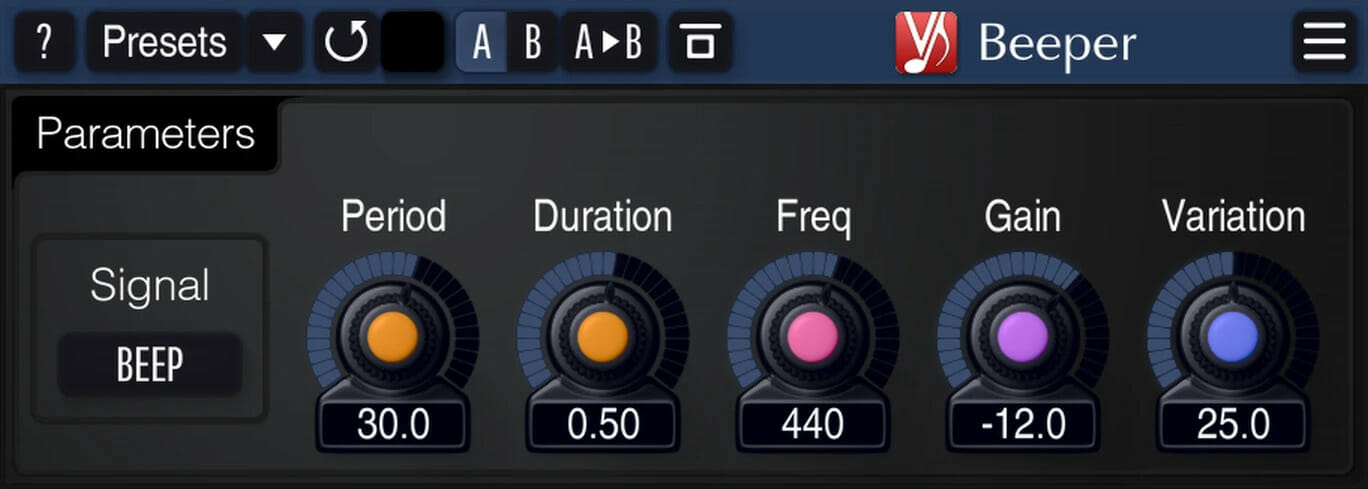
Beeper
Key Features
- Inserts beep tones, white noise bursts, or silence gaps at configurable intervals to watermark audio
- Zero processing between inserted signals preserves original audio quality on mission-critical material
- Adjustable signal duration, beep frequency, loudness, interval period, and random variation for unpredictable watermark patterns
- 64-bit floating-point internal processing with zero latency for transparent real-time operation
- A/B comparison, preset manager, and full undo/redo history for quick workflow adjustments
- Resizable interface with multiple color schemes and Retina/HighDPI display support
- Stereo and multi-channel processing with support for all sample rates
Description
Beeper by Voxengo is an audio content protection plugin that inserts short beep tones, noise bursts, or silence gaps into any audio material at regular intervals. Producers and mixing engineers use it to watermark client previews, preventing unauthorized use of in-progress mixes before final payment.
The plugin sits on a master bus or individual track and periodically injects a user-defined signal without altering the audio in between insertions, so the underlying audio quality remains completely untouched. You control the signal type, duration, beep frequency, loudness, interval period, and the amount of random variation applied to each parameter.
Randomizing the variation setting makes the watermark pattern unpredictable, which prevents easy removal through simple editing or spectral subtraction. The silence insertion mode is particularly effective for protecting instrumental mixes, since it creates obvious gaps that render the audio unusable without being as aurally fatiguing as continuous beep tones.
Beeper ships with Voxengo's standard interface features including A/B comparison, a built-in preset manager, undo/redo history, and multiple UI color schemes. The resizable interface supports Retina and HighDPI displays, keeping everything sharp on modern monitors.
Version 2.13 runs natively on Apple Silicon and supports all major plugin formats, making it compatible with virtually any modern DAW setup on both macOS and Windows.
Video Preview


Frequently Asked Questions
Does Beeper alter the audio quality between the watermark signals?
No. Beeper performs zero processing on the audio between inserted signals. The plugin only activates during the brief insertion moments, leaving the rest of your audio completely untouched and at full quality.
Can Beeper insert a custom voice tag or audio clip as the watermark?
Beeper is limited to three signal types: sine wave beep tones, white noise bursts, and silence gaps. It does not support loading custom audio files like voice tags. For custom voice watermarks, you would need a separate tool or manual editing.
How do producers typically use Beeper in a mixing workflow?
Most engineers place Beeper on the master bus when bouncing client previews. The plugin inserts periodic beeps or silence gaps that make the preview unusable as a final product, protecting the mix until the client completes payment. You simply bypass or remove the plugin for the final approved bounce.
What does the Variation parameter do?
The Variation control adds random variation to the signal duration, frequency, loudness, and interval timing. This makes the watermark pattern unpredictable, which prevents someone from easily removing the beeps through repetitive pattern-based editing or spectral subtraction.


