
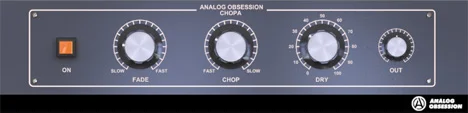
Chopa


Key Features
- Adjustable chop time for slower or faster rhythmic movement
- Fade control shapes transitions from smooth to sharp
- Dry blend retains the original signal alongside the effect
- Output level control for balancing the processed signal
- Knob readouts make timing adjustments easier to see
- Touchscreen and Retina/HiDPI interface support
Description
Chopa is a tremolo and chopper effect from Analog Obsession for adding movement to guitars, synths, and vocals. Its controls let you move from softer fluctuations to more abrupt rhythmic cuts.
The Chop control sets the time between changes, while Fade adjusts the transitions between chopped sections. Short fades can produce a sharper edge, and longer fades offer a smoother contour.
A Dry control blends the original signal back into the processed sound, making it possible to retain more of the source while adding motion. Output level is adjustable independently, which helps when balancing the processed signal in a mix.
Version 3.0 expands the chop and fade ranges and adds a redesigned interface with knob readouts, touchscreen support, and Retina/HiDPI display support. Its simple control set makes it a useful starting point when you want to shape movement by ear.
Chopa sets timing in milliseconds rather than offering a documented tempo-sync control; users have requested sync on the developer's post. The developer lists separate Mac and Windows downloads, with the stated operating-system support ending at macOS 12 and Windows 11.
Frequently Asked Questions
Can Chopa synchronize its chop rate to the project tempo?
The developer describes the Chop control in milliseconds and does not list a tempo-sync feature. Users have requested sync on the product post, so set the timing manually.
How do I make the chopping effect less abrupt?
Increase the Fade setting to lengthen the transitions between chopped sections. You can also blend in more of the original signal with the Dry control.
What changed in Chopa 3.0?
The update extended the Chop and Fade ranges and redesigned the interface. It also added knob readouts, touchscreen support, and Retina/HiDPI support.


