
Chordz

Key Features
- Trigger a separate chord from each incoming MIDI note
- Build custom inversions and wide voicings across multiple octaves
- Suggest diatonic chords from a selected scale and root
- Explore more than 40 scale and chord templates
- Choose from a library of more than 50 chord types
- Use easy mode and virtual keyboards to explore chord relationships
Description
Chordz by CodeFN42 is a MIDI VST plugin that turns single notes into full chords. Play those trigger notes from a MIDI keyboard or drum pad, or place them in your DAW piano roll to sketch a progression.
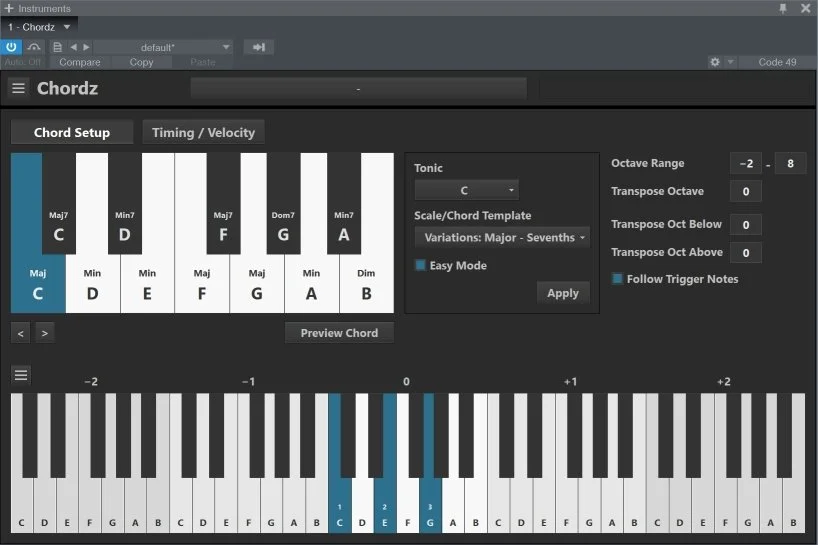
Each trigger note can have its own chord, with individual notes placed up to two octaves above or below the trigger octave. This makes it possible to build inversions, spread voicings across a wider range, or double notes in different octaves.
Chordz includes more than 40 scale and chord templates and a library of over 50 chord types. Its suggestion feature offers diatonic chords for a selected root and scale, while the interface lets you edit the resulting notes directly.
Easy mode puts the scale chords on the white keys with C as the first chord, leaving black keys available for variations. The virtual keyboards also show the notes involved, making the plugin useful for exploring the relationship between scales and chords.
Chordz sends MIDI rather than producing an instrument sound, so its output needs to reach a virtual instrument in a host that supports MIDI routing. The developer lists version 1.14 for Windows 7 or higher and a 64-bit VST2 compatible host.
Frequently Asked Questions
Does Chordz make sound on its own?
Chordz generates MIDI chords rather than instrument audio. Route its output to a virtual instrument in a compatible host to hear the chords.
Can I change the notes in a chord?
Yes. You can edit chords in the interface and arrange notes across several octaves to create custom voicings and inversions.
What does easy mode do?
Easy mode maps scale chords to the white keys, with C representing the first chord. The black keys can trigger chord variations.
Can I add my own chord templates?
Yes. The developer says you can add custom templates and define new chord types by editing the relevant text file.


