Dragonfly Room Reverb
Key Features
- Algorithmic room reverb based on the ProG Reverb engine from Freeverb3 — an open source, research-quality reverb algorithm
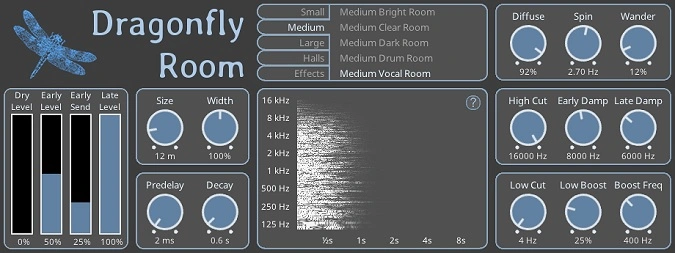
- Independent Early Level, Early Send, and Late Level controls for precise shaping of early reflections vs. late reverb tail
- Diffuse, Spin, and Wander parameters add subtle modulation and stereo width to the decay
- Dual filter sections: High Cut, Early Damp, Late Damp, Low Cut, Low Boost, and Boost Frequency for tonal sculpting
- Room size, width, predelay, and decay controls cover everything from tight ambience to medium-sized hall sounds
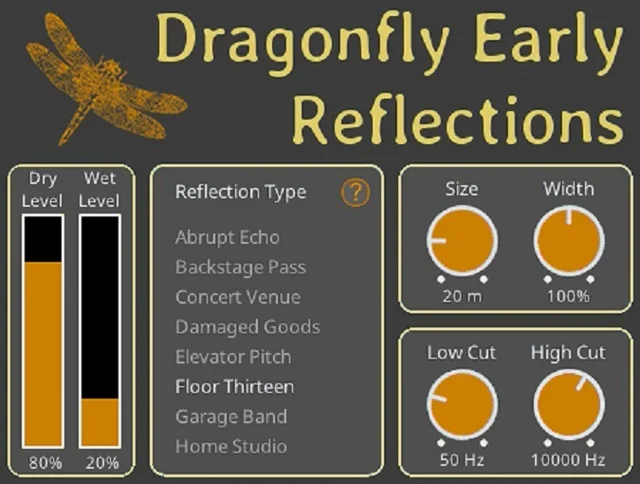
- Ships as part of the full Dragonfly Reverb suite — one download includes Room, Hall, Plate, and Early Reflections plugins
- Cross-platform: VST2, VST3, LV2, and CLAP formats for Windows, macOS, and Linux
Description
Dragonfly Room Reverb is a free, open source algorithmic reverb plugin developed by Michael Willis. Released under the GPL 3.0 license, it is available for Windows, macOS, and Linux with no cost, no sign-up, and no restrictions.
The plugin is built on the ProG Reverb algorithm from the Freeverb3 library. It simulates the acoustics of physical room spaces, producing dense early reflections that build naturally into a smooth late reverb tail.
Dragonfly Room Reverb offers precise control over room size, width, predelay, and decay alongside advanced parameters like Diffuse, Spin, and Wander — which add subtle movement and width to the reverb tail. Independent Early Level, Early Send, and Late Level knobs let you sculpt exactly how much early and late energy reaches the mix.
Two built-in filter sections handle high-frequency damping, low-cut, low boost, and boost frequency targeting. These make it straightforward to dial in a realistic room character without muddying the low end or adding harshness to the top.
Dragonfly Room Reverb is one of four reverbs in the Dragonfly suite — alongside Hall, Plate, and Early Reflections. One download gives you the complete suite as a single installer.
With a perfect 5.0 rating on KVR Audio, producers consistently describe it as competitive with commercial reverbs costing over 100€. It is a genuinely professional tool at no cost.
Video Preview


Tips
- Experiment with different room presets to find the best fit for your track.
- Use the High Cut and Low Cut filters to remove unwanted frequencies from the reverb.
- Adjust the Early Level and Late Level controls to balance the early reflections and late reverb tail.
- Utilize the Diffuse, Spin, and Wander controls to add movement and depth to the reverb.
- Apply the reverb to individual tracks or use it on a send/return bus for more control.
- Combine Dragonfly Room Reverb with other reverb types from the Dragonfly series for a richer sound.
- Save your favorite settings as presets for quick recall in future projects.
Frequently Asked Questions
Does downloading Dragonfly Room Reverb give me the other three Dragonfly reverbs too?
Yes. The Dragonfly Reverb download is a single installer that includes all four plugins in the suite: Room, Hall, Plate, and Early Reflections. You get the complete collection in one file, for all supported platforms.
What is the difference between Dragonfly Room and Dragonfly Hall?
Room is designed for tighter, more intimate acoustic spaces — shorter, denser reflections with a more immediate sound. Hall targets larger, more diffuse environments with longer tails and more pronounced early reflection patterns. Room typically works better for vocals, acoustic guitar, and drums where you want presence without washing the sound out.
How does Dragonfly Room Reverb compare to paid reverbs like Valhalla Room?
KVR Audio reviewers consistently describe Dragonfly Room as competitive with commercial reverbs costing over €100. It does not have the same range of reverb algorithms or DSP sophistication as a dedicated paid plugin, but its core room sound is clean, dense, and mixes well. For producers who want a reliable algorithmic room reverb at no cost, it holds up against many paid options.
Is Dragonfly Room Reverb CPU-intensive?
It is reasonably lightweight. The plugin runs efficiently enough to use on multiple tracks simultaneously on most modern systems. CPU usage is proportional to decay time and the amount of early reflections — longer settings require slightly more processing, but it is not a heavy plugin by any standard.