
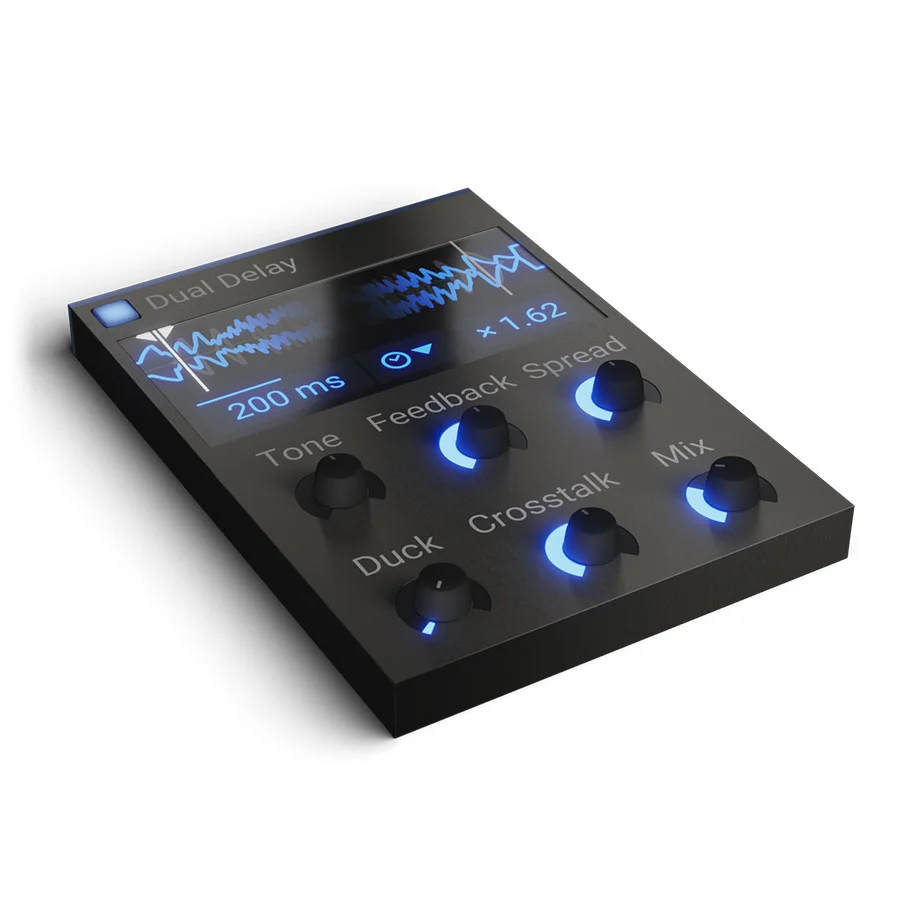
Dual Delay
Key Features
- Dual crossfeeding delay lines that interact through an adjustable Crosstalk control, creating everything from subtle stereo widening to dense reverb-like textures
- Tempo-syncable delay times with a ratio control that links the second delay to the first for musically locked rhythmic patterns
- Built-in ducking that automatically attenuates the delay output when the input signal is loud, keeping echoes clear of the dry signal
- Tone shaping via a shelf filter on the feedback path to darken or brighten successive repeats without external processing
- Spread control for precise stereo image adjustment of the delay tails from mono-focused to wide panoramic placement
- Snapin compatibility with Phase Plant, Multipass, and Snap Heap for deep modular sound design and effect chaining
Description
Dual Delay by Kilohearts is a stereo delay effect that blurs the line between echo and reverb. Its two crossfeeding delay lines work in tandem, producing rich and complex echoing patterns that go far beyond what a standard single-tap delay can achieve.
The plugin pairs the two delay lines with six hands-on controls: Tone shapes the echo character through a shelf filter, Feedback sets the decay length, Spread adjusts the stereo width, Duck automatically lowers the wet signal when input is loud, Crosstalk bleeds audio between the two lines for evolving textures, and Mix dials in the dry/wet balance. You set the first delay time manually or sync it to your DAW's tempo, then define the second as a ratio of the first.
That crosstalk parameter is where Dual Delay distinguishes itself. By pushing the bleed between the two lines, you can create anything from subtle spatial widening to dense, reverb-like washes that build and evolve over time.
Beyond standalone use, Dual Delay doubles as a Snapin inside Kilohearts' modular hosts Phase Plant, Multipass, and Snap Heap. This lets you combine it with other Kilohearts effects and apply modulation for sound design possibilities that go well beyond a typical delay plugin.
Dual Delay is part of the Kilohearts Essentials collection and runs on macOS (Apple Silicon supported) and Windows in VST2, VST3, AU, and AAX formats at 64-bit only.
Video Preview


Frequently Asked Questions
How does Dual Delay differ from the standard Kilohearts Delay plugin?
The standard Kilohearts Delay is a single-line delay with ping-pong and ducking options. Dual Delay adds a second delay line with independent ratio-based timing and a Crosstalk knob that bleeds audio between the two lines, allowing complex rhythmic patterns and reverb-like textures that a single delay cannot produce.
Can Dual Delay be used as a Snapin inside Kilohearts modular hosts?
Yes. Dual Delay works as a standalone plugin in any DAW and also loads as a Snapin inside Phase Plant, Multipass, and Snap Heap. As a Snapin, you can chain it with other Kilohearts effects and apply modulation to its parameters for more creative sound design.
What does the Crosstalk control actually do?
Crosstalk controls how much audio bleeds from one delay line into the other. At low settings it adds subtle stereo interaction between the two echoes. At higher settings the two lines feed into each other heavily, building up dense, almost reverb-like wash effects.
Does Dual Delay support tempo sync?
Yes. You can set the first delay time in milliseconds for manual control or switch to sync mode where the delay time locks to your DAW's tempo as a note division. The second delay is always set as a ratio of the first, so both lines stay rhythmically linked.


