
Dyst

Key Features
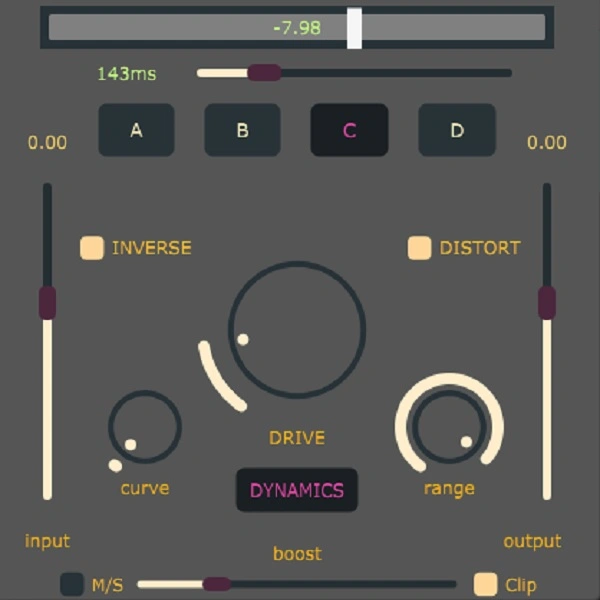
- Four saturation curves (A-D) with distinct tonal characters from smooth warmth to aggressive grit
- Built-in dynamics processor with adjustable threshold for transient-sensitive saturation
- Mid/side processing mode for independent saturation of center and stereo width channels
- Pre-clip boost that pushes gain staging to extremes for creative distortion effects
- AirWindows-powered clean soft clipper that prevents harsh digital clipping
- Minimal interface with central drive knob and dedicated input/output gain sliders
- Dynamic response that adapts saturation intensity based on input signal level
Description
Dyst by Aarrow (Aaron Walker) is a dynamic saturation plugin that responds to input signal levels, letting you shape how hard the saturation hits based on transient peaks and quiet details. It offers four distinct saturation curves labeled A through D, each with its own tonal character ranging from smooth warmth to aggressive grit.
The built-in dynamics processor sets a threshold that controls how the saturation reacts to different signal levels. Push it harder and transients explode with harmonic content, or dial it back for subtle low-level enhancement.
Mid/side processing lets you apply saturation independently to the center and sides of the stereo field, which is particularly effective for adding width to drum buses and mix buses. The pre-clip boost pushes the signal well beyond normal gain staging for extreme distortion effects.
A clean soft clipper sourced from AirWindows catches peaks before they clip digitally, keeping output controlled even at aggressive settings. The interface stays minimal with a central drive knob flanked by input and output gain sliders.
Curves A and B excel at mix bus duties where you want musical harmonic enhancement without obvious distortion. Curve C delivers the most aggressive character and works especially well in parallel on drum buses, bringing percussion to life with punchy transient saturation.
Video Preview

Tips
- Experiment with different saturation curves to find the best fit for your track.
- Use the mid/side processing to add width and depth to your mix.
- Apply the pre-clip boost for aggressive distortion effects.
- Adjust the dynamics processor threshold to enhance transients and low-level details.
- Combine different saturation types in parallel processing for unique textures.
- Use the input and output gain sliders to maintain proper levels and avoid clipping.
- Try using Dyst on drum buses to add punch and character to your percussion.
- Utilize the soft clipper to prevent harsh digital clipping while maintaining a warm sound.
Frequently Asked Questions
Does Dyst work in Logic Pro?
Dyst supports AU format, which is Logic Pro's native plugin format. It should load directly in Logic Pro without needing any wrapper or workaround.
What is the difference between the four saturation curves?
Curves A and B provide smoother, more musical saturation suited to mix bus processing and subtle harmonic enhancement. Curve C is the most aggressive option, ideal for parallel processing on drums. Curve D falls between, offering moderate grit with more character than A/B.
How does the dynamics processor work in Dyst?
The dynamics processor uses a threshold control to determine how the saturation responds to input levels. Signals above the threshold get saturated more heavily, which means transients receive more harmonic content while quieter parts of the signal are processed more gently.
Can Dyst be used for parallel processing?
Yes, Dyst works exceptionally well in parallel. Running it on a parallel bus with Curve C on drum groups is one of its standout use cases, adding punch and liveliness without overwhelming the dry signal.


