
Frontier
Key Features
- Self-adaptive automatic gain makeup that normalizes output volume as the threshold is lowered, eliminating manual level matching
- Three selectable release envelope modes (fast, medium, slow) that control both attack and release characteristics of the limiter's VCA
- Optional soft clip mode with diode-style saturation for adding harmonic warmth and wave-shaping capabilities beyond standard limiting
- Configurable control input accepting L/R stereo, left-only, right-only, or mid signal for creative sidechain-style ducking and processing
- Adjustable processing quality with separate real-time and render settings to balance CPU efficiency during mixing with maximum fidelity on export
- Resizable HiDPI GUI with multiple size options, tag-based preset browser, and full MIDI Learn support across all parameters
Description
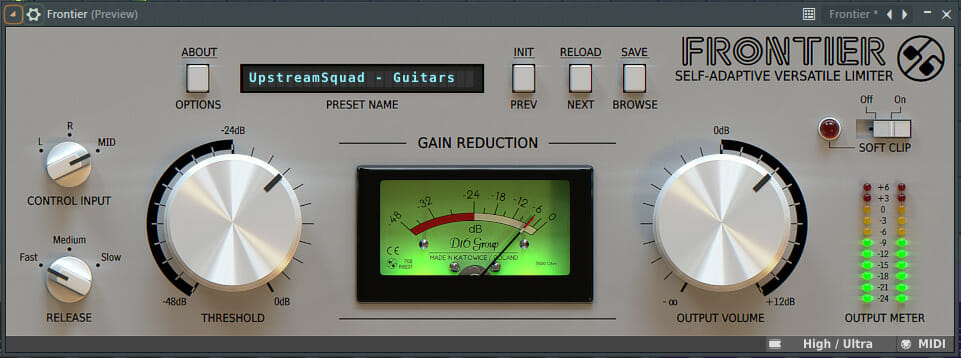
Frontier is a self-adaptive versatile limiter from D16 Group, designed for controlling dynamics on individual tracks, buses, or the master output. Its automatic gain makeup algorithm normalizes the output volume as you lower the threshold, letting you hear the effect of limiting in real time without constant level adjustments.
The interface keeps things minimal with just two main knobs for threshold and output gain, alongside three selectable release modes (fast, medium, slow) and a configurable control input that accepts left, right, or mid signal components. This streamlined layout makes it easy to dial in transparent peak limiting or push into more aggressive territory.
Beyond standard limiting, the optional soft clip feature introduces diode-style saturation that cuts peaks exceeding 0 dB. When driven hard, this transforms Frontier from a clean dynamics tool into a wave-shaping effect capable of adding harmonic warmth and punch to drums, synths, and vocals.
The plugin also doubles as a mono ducker when configured with a single channel as the control input, opening up creative sidechain-style processing. An advanced options menu lets you set different processing quality levels for real-time playback versus offline rendering, saving CPU during mixing while maintaining maximum fidelity on export.
Frontier supports HiDPI displays with multiple resizable GUI sizes, includes a tag-based preset browser, and offers full MIDI Learn functionality across all parameters. Internal processing runs at 64-bit precision throughout the signal path.
Video Preview


Frequently Asked Questions
Do I need to own a D16 product to download Frontier?
You need to create a registered account on the D16 Group website to download Frontier. Previously it required a prior purchase, but D16 has made it available to all registered users. After creating an account, you can download and activate the plugin using your login credentials.
Can Frontier be used for mastering or is it just a mixing tool?
Frontier works well in both contexts. At conservative threshold settings it acts as a transparent mastering limiter that catches the loudest peaks, while more aggressive settings with the soft clip engaged make it effective as a creative mixing tool for adding punch and saturation to individual tracks or buses.
What does the Control Input selector actually do?
The Control Input determines which signal component drives the limiter's amplitude detection. Setting it to L or R uses a single stereo channel as the control signal while processing both channels, effectively turning Frontier into a mono ducker. The Mid setting responds to the center of the stereo image, useful for taming vocal or kick drum peaks without affecting panned elements as heavily.
How does the soft clip mode differ from standard limiting?
Standard limiting uses gain reduction to prevent the signal from exceeding the threshold, while soft clip mode adds a diode-style saturation stage that clips peaks exceeding 0 dB. This introduces harmonic distortion that can sound warmer and more aggressive than clean limiting, making it useful as a creative effect for adding grit and density to drums, synths, or full mixes.


