
GComp2
Key Features
- Unified Compress knob that combines threshold and ratio into a single intuitive control for fast setup
- Built-in expander/gate that progressively attenuates the signal below a user-defined threshold
- Adjustable lo-cut and hi-cut filters on the input stage for pre-compression frequency shaping
- Real-time dual waveform display showing both original and compressed signals for visual feedback
- Dedicated input gain control that influences compressor behavior and dynamics response
- Full attack, release, and output makeup gain controls for precise dynamics tailoring
- Minimal CPU footprint suitable for use across multiple tracks in a session
Description
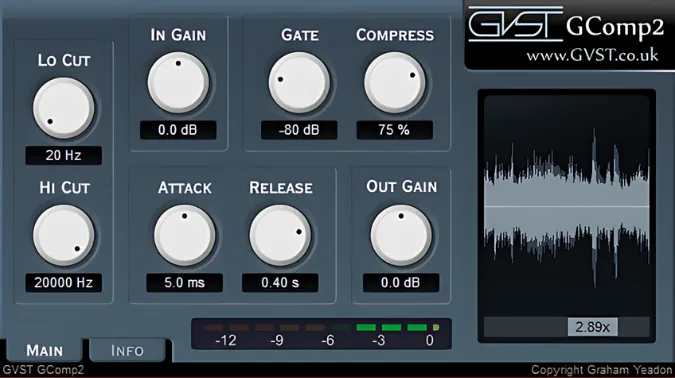
GComp2 by GVST is a streamlined dynamics processor that combines a compressor, expander/gate, and high/low-pass filters in a single interface. Rather than separate threshold and ratio controls, GComp2 uses a unified Compress knob that scales both parameters together, making it quick to dial in the right amount of gain reduction without fiddling with multiple settings.
The built-in gate section works as an expander, progressively turning the signal down once it drops below the set threshold. Paired with adjustable lo-cut and hi-cut filters on the input stage, you can shape the frequency content before it ever reaches the dynamics processing, which is useful for taming low-end rumble or thinning out harsh high frequencies on the way in.
A real-time waveform display on the right side of the interface shows both the original and processed signals simultaneously. The darker shadow waveform represents the uncompressed audio while the brighter cyan trace shows the post-processing result, giving you immediate visual confirmation of how your settings affect the dynamics.
Input gain plays a significant role in how GComp2 responds, since it directly influences how the compressor reacts to the incoming signal. Combined with the output makeup gain control, you get a complete signal chain from input conditioning through dynamics processing to final level adjustment.
GComp2 is part of the larger GVST plugin suite developed by Graham Yeadon, and while each of its individual components has more advanced counterparts in the collection, the strength here is having compression, gating, and filtering unified in one lightweight tool.
Video Preview

Frequently Asked Questions
How does the Compress knob work compared to standard threshold and ratio controls?
The Compress knob combines threshold and ratio into a single parameter. As you increase compression, the threshold lowers and the ratio increases simultaneously. This simplified approach lets you dial in gain reduction faster, though it offers less surgical control than separate threshold and ratio knobs.
Is GComp2 suitable for bus compression or only individual tracks?
GComp2 works well on both individual tracks and busses. Users report good results on instrument groups like pianos and acoustic guitars, as well as on mix busses where gentle glue compression is needed. The lightweight CPU usage makes it practical for stacking across multiple channels.
What is the difference between GComp2 and GComp in the GVST suite?
GComp is a more fully-featured compressor with RMS and peak detection modes, stereo linking, and knee adjustment. GComp2 trades those advanced options for a simpler interface that adds an expander/gate and input filters. If you need detailed compressor control, GComp is the better choice; if you want an all-in-one dynamics tool with fewer knobs, GComp2 is more efficient.
Can the gate section be used for noise reduction?
Yes, the gate functions as an expander that progressively reduces the signal level when it falls below the set threshold. This is effective for reducing background noise, mic bleed, or low-level hum during quiet passages. It is not a hard gate, so transitions are smoother and more natural sounding.


