
GLS Tonebytes
Key Features
- Central channel subtraction removes vocals located in the stereo center without requiring stems or multitrack files
- Bass and drum preservation algorithm protects low-end elements that share the center channel during vocal removal
- Adjustable subtraction depth lets you control how aggressively vocals are removed versus how much of the original mix is preserved
- Works in real time within your DAW, allowing you to audition vocal removal results instantly during playback
- Compatible with major Windows DAWs including Cubase, FL Studio, Ableton Live, Sonar, Orion, and Reaper
- Lightweight footprint with a download under 2 MB and minimal CPU overhead during processing
Description
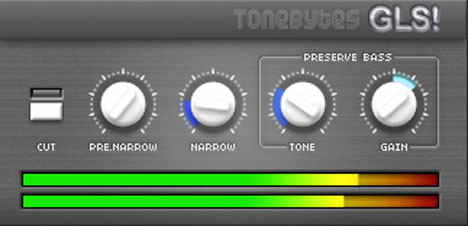
GLS (Get Lost, Singer!) by ToneBytes is a vocal removal effect plugin that strips vocals from stereo music tracks. It uses central channel subtraction to isolate and remove the vocal signal, which typically sits in the center of the stereo field.
The plugin works best on tracks with clear stereo separation and dry, unprocessed vocals. Wet or heavily reverbed vocals are harder to remove cleanly, and mono tracks are not supported at all.
GLS preserves bass and drums during the removal process, since these elements also occupy the center channel and would otherwise be lost. The result is a usable instrumental or backing track, though some artifacts and stereo narrowing are inevitable with this technique.
The interface is straightforward, with controls for adjusting the subtraction depth and fine-tuning which frequencies are affected. It handles common vocal removal tasks like creating karaoke-style backing tracks, isolating instrumental elements for remixing, and extracting accompaniment for practice or sampling.
GLS runs as a 32-bit Windows-only VST plugin tested in Cubase, Sonar, Ableton Live, FL Studio, Orion, and Reaper. The download is compact at roughly 1 MB, making it a lightweight addition to any Windows production setup.
Video Preview

Frequently Asked Questions
Does GLS completely remove all vocals from a track?
No. GLS uses central channel subtraction, which targets audio panned to the center of the stereo field. It works well on dry, centered vocals but will not fully remove vocals that are panned, heavily reverbed, or doubled across the stereo image. Some artifacts and residual vocal traces are normal.
Can GLS separate individual instruments from a mix?
GLS is designed specifically for vocal removal, not full stem separation. It subtracts the center channel where vocals typically sit, but it cannot isolate bass, drums, or other instruments independently. For multi-stem separation, you would need a dedicated AI-based stem splitter.
Why does the audio lose stereo width after processing with GLS?
Central channel subtraction works by canceling out audio that is identical in both the left and right channels. This inherently reduces the stereo image because the shared center content is removed. The resulting output will sound narrower than the original mix.
Is GLS available as a 64-bit plugin or for macOS?
No. GLS is a 32-bit Windows VST plugin only. There is no 64-bit version, no macOS build, and no Linux version. You can run it in a 64-bit DAW using a 32-bit bridge like jBridge or the built-in bridge in some hosts.


