
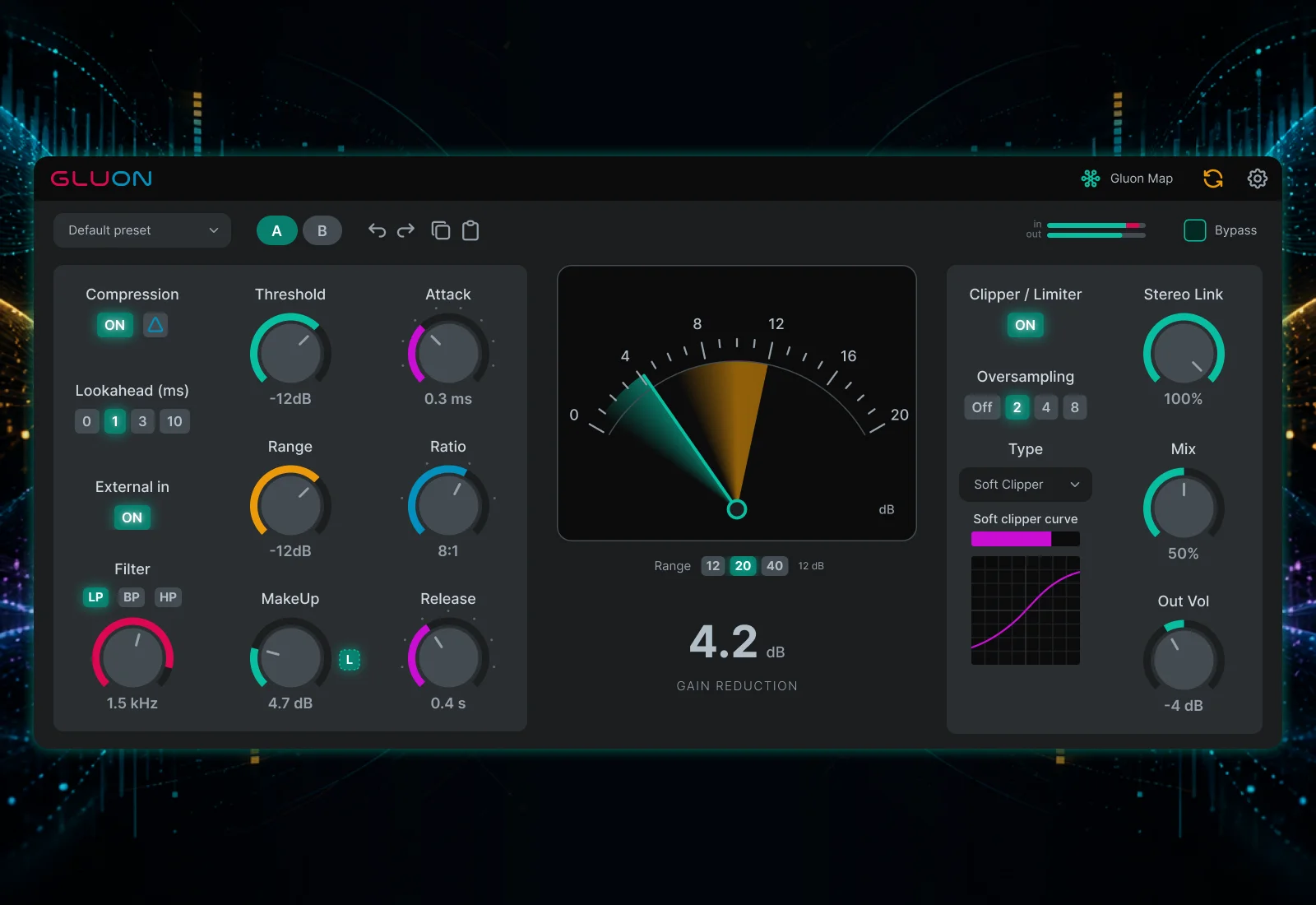
Gluon
Key Features
- Gluon Map shows settings and meters for connected instances and can control them while their plugin windows are closed.
- Global Control makes relative changes across selected instances while preserving their individual starting values.
- Expanded compression timing includes 0.01-60 ms attack, 0.05-2 second release plus Auto, and independent compressor lookahead.
- Delta monitoring auditions the compressed difference before MakeUp, Mix, and output processing.
- Adjustable Soft Clip provides five blended curve shapes with a live transfer graph.
- Limiter release spans 5-150 ms plus Auto, with independent lookahead and a separate final Out Volume control.
- Factory and user presets, saved defaults, A/B, undo/redo, copy/paste, interface scaling, and optional update checks support everyday workflow.
Description
Gluon 1.1.0 is a bus compressor from nClear Audio built for mix cohesion, drum punch, and parallel density. Its Gluon Map gathers connected instances into one window so you can inspect levels and adjust one compressor or several without reopening every plugin editor.
The compressor provides attack from 0.01 to 60 ms, ratios from 1.5:1 to 20:1, release from 0.05 to 2 seconds plus Auto, and independent compressor lookahead choices of 0, 1, 3, or 10 ms. Range limits the maximum gain reduction, Mix handles parallel blending, Delta monitoring lets you hear the compressed difference before makeup, blend, and output processing, while the optional external sidechain and detector filters shape what triggers compression.
Version 1.1.0 expands the independent output stage with an adjustable Soft Clip curve, five smoothly blended shapes, and a live transfer graph. The limiter now has release from 5 to 150 ms plus an adaptive Auto mode, its own 1, 3, or 10 ms lookahead, and a separate Out Volume control after clipping or limiting.
Gluon Map can start MakeUp Learn remotely, including on instances whose editors are closed. Global Control makes relative changes across selected instances, while settings and metering stay shared without routing audio between tracks.
The redesigned interface adds clearer Gain, Timing, Sidechain, and Output sections, position markers for stepped controls, and a command to save current settings as the default for new instances. Gluon remains available without activation or paid feature locks for macOS, Windows, and Linux through nClear's email-based name-your-price download flow.
Video Preview

Frequently Asked Questions
What does Gluon Map actually share between instances?
It shares settings and metering so you can inspect and adjust connected Gluon instances from one window. It does not route audio between tracks.
Will every Gluon instance appear in Map?
The instances must run as the same plugin module within the same DAW process. Different plugin formats or sandboxed instances may not see each other, and a host that keeps multiple projects in one process may show instances from more than one project.
What is MakeUp Learn for?
It measures a short section of audio and sets a fixed makeup-gain value for a closer level-matched comparison. You can run it again after changing compressor settings.
Does Gluon require activation or a paid unlock?
nClear says the complete plugin has no activation and no paid feature locks. Its name-your-price form accepts a zero-dollar download, with an email address required for delivery.
What changed in Gluon 1.1.0?
Version 1.1.0 adds an adjustable Soft Clip curve with a live transfer graph, limiter release and Auto mode, independent compressor and limiter lookahead, Delta monitoring, final Out Volume, remote MakeUp Learn in Gluon Map, and saved defaults for new instances. It also redesigns the interface, adds markers for stepped controls, and fixes recall of both A/B states in projects and presets.


