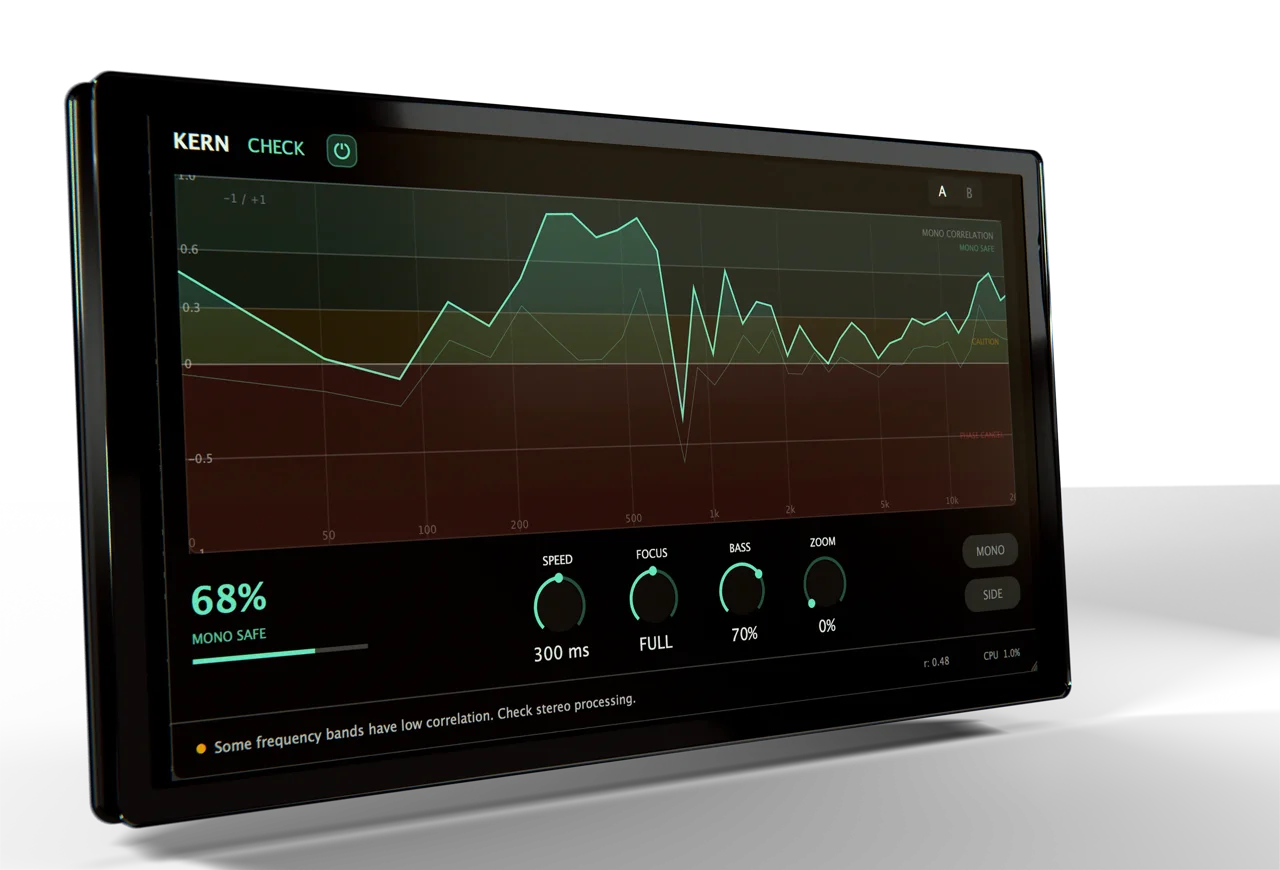
KERN CHECK

Key Features
- 40-band spectral correlation curve mapped to human hearing perception using the ERB (Equivalent Rectangular Bandwidth) scale, showing per-frequency mono compatibility in real time
- Bass-weighted mono score (0-100%) that weights low frequencies three times heavier than highs, reflecting real-world mono collapse priorities on club systems and consumer speakers
- Color-coded frequency zones (green/amber/red) for instant visual identification of safe, questionable, and problematic stereo imaging areas
- MONO and SIDE monitoring buttons for direct auditory comparison -- collapse to mono to hear what disappears, or isolate the side signal to identify at-risk elements
- FOCUS knob with LOW, FULL, and HIGH ranges for targeted frequency analysis of specific problem areas without cluttering the display
- Zero-latency 2048-point FFT analysis running under 3% CPU at 44.1kHz, suitable for real-time monitoring during mixing and mastering sessions
- Available as VST3 and AU with no iLok, subscription, or account required -- permanently free with no feature restrictions
Description
KERN CHECK is a spectral mono compatibility analyzer from Copenhagen-based developer Jonas R that visualizes exactly where a stereo mix collapses when summed to mono. Rather than relying on a single correlation number, it splits the signal into 40 frequency bands mapped to human hearing perception using the ERB (Equivalent Rectangular Bandwidth) scale.
The real-time correlation curve uses color-coded zones to flag problem areas at a glance. Green indicates mono-safe frequencies, amber warns of potential issues, and red highlights bands that will phase-cancel on mono playback systems.
A bass-weighted mono score from 0 to 100% provides a single readability metric, with low frequencies weighted three times heavier than highs. This reflects real-world priorities since bass collapse causes the most damage on club PA systems and laptop speakers.
Four controls keep the interface focused without sacrificing depth. SPEED adjusts curve responsiveness for tracking fast transients or averaging over longer passages.
FOCUS isolates low, full, or high frequency ranges for targeted analysis. BASS controls the low-frequency weighting in the score calculation, while ZOOM adjusts vertical display range for fine detail.
Dedicated MONO and SIDE monitoring buttons let you audition the damage directly. MONO collapses the output to hear what disappears, while SIDE isolates the difference signal to identify the elements at risk.
The underlying analysis uses 2048-point FFT resolution with zero added latency, running under 3% CPU at 44.1kHz. This makes it lightweight enough to leave active on the master bus throughout an entire mixing session.
Video Preview

Frequently Asked Questions
How is KERN CHECK different from a standard correlation meter?
Standard correlation meters show a single number for the entire stereo signal, making it impossible to tell which frequencies are causing problems. CHECK splits the analysis into 40 perceptual frequency bands, so you can see that your bass is mono-safe while a specific reverb return around 2kHz is causing phase cancellation. This frequency-specific view lets you fix problems surgically rather than guessing.
What mono score should I aim for in my mixes?
KERN recommends a threshold of 60% as a general guideline, particularly for music destined for club systems or broadcast. The bass-weighted scoring means the number reflects low-end mono safety more heavily, which is where collapse matters most. Scores above 60% generally indicate a mix that will translate well to mono playback.
Does CHECK fix mono compatibility problems or only diagnose them?
CHECK is purely a diagnostic tool -- it shows you where problems exist but does not alter the audio. KERN's paid plugins SMOOTH, WARM, and WIDE are designed to address mix issues, while CHECK focuses solely on analysis with zero processing latency. For fixing mono issues, you would typically narrow the stereo width on problem frequency bands using a mid/side EQ or stereo imaging plugin.
Can I use CHECK on individual tracks or only on the master bus?
CHECK works on any stereo channel in your DAW, not just the master bus. Inserting it on individual stereo tracks, group buses, or effect returns can help isolate exactly which element is causing mono compatibility issues before they compound in the full mix.