Melodic Techno
Audio Preview
Description
Melodic Techno by Van Múrten is an Ableton Live template designed to help music producers create tracks in the melodic techno genre.
This template includes a fully arranged project file, complete with all the necessary elements to produce a professional-sounding track.
The project features intricate rhythms, deep basslines, and lush melodic elements, all characteristic of the melodic techno style.
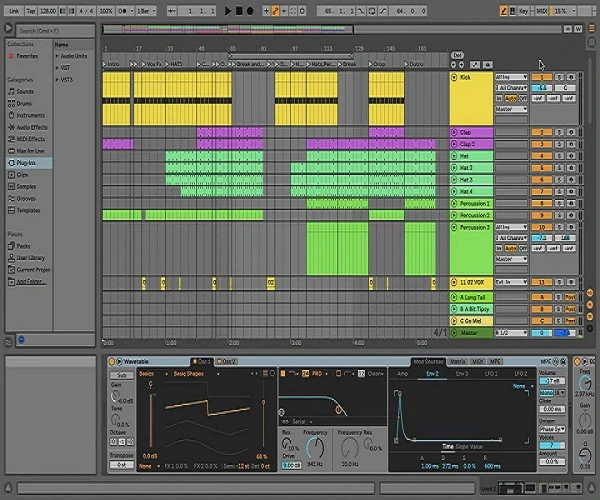
The template is structured with multiple tracks, including drums, bass, synths, and effects.
Each track is thoughtfully arranged and processed, providing a clear and organized layout that makes it easy to understand and manipulate.
The drum section includes a variety of percussive elements, such as kicks, snares, hi-hats, and cymbals, all programmed to create a driving rhythm.
The bassline is deep and pulsating, providing a solid foundation for the track.
The synths and melodic elements are layered and modulated to create a rich and evolving soundscape.
Additionally, the template includes a range of audio effects and processing techniques, such as EQ, compression, reverb, and delay, all applied to enhance the overall sound.
The project file also features automation and modulation to add movement and dynamics to the track, making it more engaging and professional.
Video Preview

Tips
- Customize the Drum Patterns: Experiment with the drum patterns by adding or removing elements to suit your style. You can change the rhythm or add new percussive sounds to make the track unique.
- Modify the Synth Presets: Tweak the synth presets to create your own signature sound. Adjust parameters like filter cutoff, resonance, and envelope settings to personalize the melodic elements.
- Layer Additional Sounds: Enhance the depth of your track by layering additional sounds. You can add more synths, pads, or atmospheric effects to create a fuller and more immersive soundscape.
- Utilize Automation: Take advantage of the automation lanes in the project file. Automate parameters such as volume, panning, and effects to add movement and variation to your track.
- Experiment with Effects: Play around with the audio effects included in the template. Try different settings for reverb, delay, and modulation effects to discover new textures and enhance the overall mix.
![Melodic Techno[EP7] by Van Múrten](https://images.soundshockaudio.com/products/melodic-technoep7/thumb.webp)