
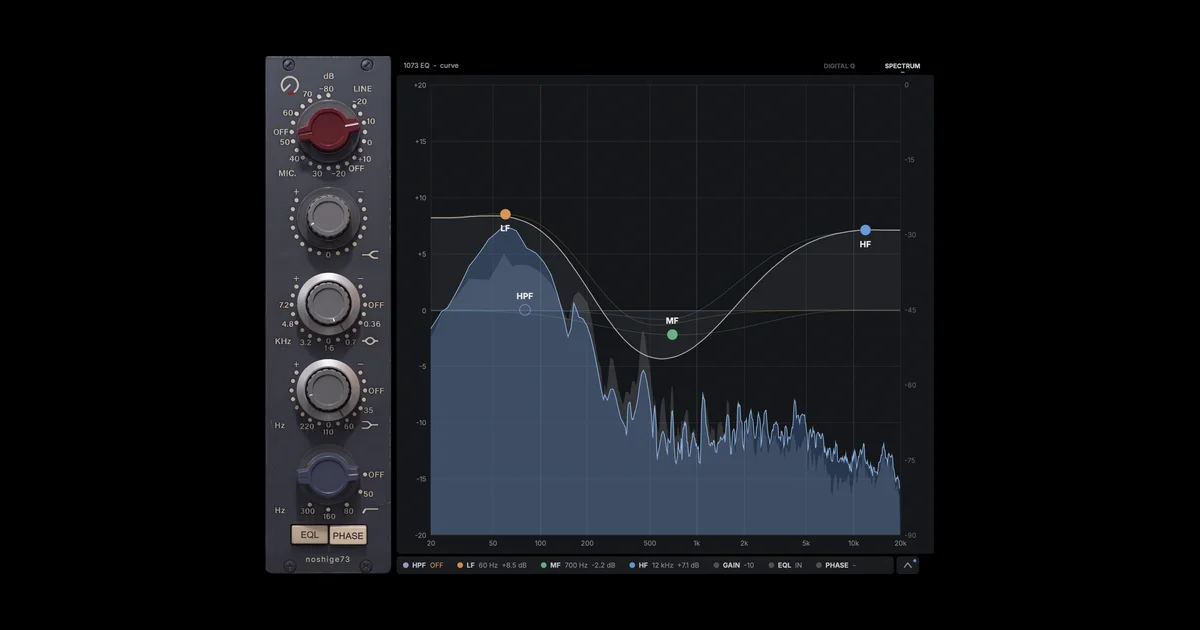


Key Features
- Three console-style EQ bands and a high-pass filter shape broad frequency ranges.
- Switchable mid and low-shelf frequencies support targeted tonal changes.
- Drag EQ bands on a curve with input and output spectrum displays.
- Stepped input gain, input and output trims, and phase inversion support gain staging.
- Automatic gain compensation helps compare tonal changes at similar levels.
- Mix control blends processed and unprocessed audio; 62 factory presets provide starting points.
Description
noshige73 LITE is a 1073-style console EQ from noshigeSound, using an AI model trained on a vintage hardware unit. Its three EQ bands and high-pass filter offer a classic console layout alongside a modern visual display.
The high shelf is fixed at 12 kHz, while the mid band offers six frequency choices and the low shelf offers four. You can turn the faceplate controls or drag the bands on a curve, with input and output spectra helping you see the changes.
Stepped input gain, phase inversion, automatic gain compensation, input and output trims, and a mix control extend the hardware-inspired workflow. The release includes 62 factory presets, giving you starting points for shaping individual tracks or buses.
LITE is permanently free and needs no account or license; it shares its controls with the paid PRO tier but uses a smaller model. The unlicensed PRO mode adds periodic noise, including during exports, so select LITE for uninterrupted use.
The plugin runs in VST3, AU, and AAX hosts on supported macOS and Windows systems. BPB reports substantial CPU demand; compatible Apple Silicon or NVIDIA hardware can use GPU processing at supported buffer sizes, with added latency.
Frequently Asked Questions
Is noshige73 LITE permanently free?
Yes. The developer says LITE has no time limit and requires no account or license. PRO is a separate paid model in the same installer.
How does LITE differ from PRO?
Both tiers have the same controls, but PRO uses a larger AI model. The unlicensed PRO trial adds periodic noise, including in exports; LITE does not have that trial restriction.
Can the plugin use a GPU?
Yes, on supported Apple Silicon Macs or NVIDIA GPUs with compatible buffer settings. The plugin otherwise runs on the CPU, and GPU processing adds latency.
Which plugin formats are supported?
The developer lists VST3, AU, and AAX. AU is for macOS, while supported systems include macOS 10.13 or later and 64-bit Windows 10 or later.


