OccularScope
Key Features
- Beat-synced display locks to your DAW tempo, showing either a single beat or full bar for precise waveform analysis tied to musical timing
- Side-chain input overlay lets you visually compare two audio signals in real time -- useful for checking kick/bass interaction or A/B comparisons
- Freeze button captures a waveform snapshot so you can study transient detail without the display continuing to update
- Adjustable delay compensation corrects for plugin latency in your signal chain, ensuring the displayed waveform aligns accurately
- Auto or manual gain control (linked or per-input) keeps the display readable regardless of signal level differences
- Fully resizable interface with dark and light themes plus customizable color schemes adapts to any workflow and screen size
- Native Apple Silicon support ensures smooth performance on modern Macs without Rosetta emulation
Description
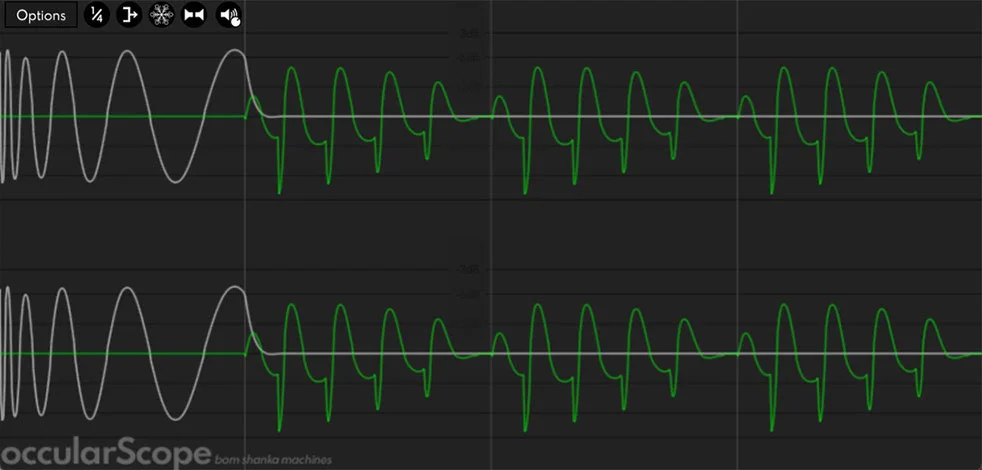
OccularScope is a free beat-synced oscilloscope plugin by Bom Shanka Machines that lets you visualize audio waveforms locked to your DAW's tempo. Unlike standard oscilloscopes that display a continuous, unsynchronized stream, OccularScope snaps its display to either a single beat or a full bar, making it straightforward to isolate and examine specific moments in your audio -- such as how a compressor reshapes a kick drum's transient or how a kick and bass interact on a bus.
The plugin accepts a side-chain input that can be overlaid on or summed with the primary signal, which is particularly useful for comparing two sources visually in real time. A freeze button captures a snapshot of the current waveform for closer inspection without the display continuing to scroll.
You can switch between line and filled waveform rendering, toggle stereo or mono display modes, and adjust gain either automatically or manually (linked or per-input). An adjustable delay compensation control allows you to offset the waveform display to correct for plugin latency in your signal chain.
OccularScope runs on Windows, macOS (including native Apple Silicon), and Linux. It supports VST3, CLAP, and Audio Unit (macOS only) formats.
The interface is fully resizable and offers both dark and light themes with customizable color schemes. The plugin is offered for free in memory of Finbar 'Occular' Dodd, with the developer encouraging donations to Type I diabetes research (JDRF) in his honour.
Currently at version 1.4.3, OccularScope has earned a strong reputation in the free plugin community for its low CPU usage and clean, focused feature set.
Video Preview


Frequently Asked Questions
Is OccularScope really free?
Yes. OccularScope is completely free with no feature restrictions. The developer created the plugin in memory of Finbar "Occular" Dodd and asks that users consider donating to JDRF (a Type I diabetes research charity) instead of paying for a license.
What plugin formats does OccularScope support?
OccularScope supports VST3, CLAP, and Audio Unit (macOS only). Note that VST2 and 32-bit Windows support were dropped in version 1.4.2. The plugin runs on Windows 10+, macOS 10.11+, and Linux.
Does OccularScope work on Apple Silicon Macs?
Yes. Since the 2022 update, OccularScope includes native Apple Silicon (M1 and newer) support, so it runs natively without requiring Rosetta emulation.
How is OccularScope different from a regular oscilloscope plugin?
Most oscilloscope plugins display a free-running waveform that is not tied to musical timing. OccularScope synchronizes its display to your DAW tempo, showing exactly one beat or one bar at a time, making it much easier to analyze specific rhythmic elements.
Can I compare two audio signals with OccularScope?
Yes. OccularScope has a side-chain input that can be displayed as an overlay on top of the primary input or summed with it. This is useful for comparing dry vs processed signals or checking how two instruments interact.