Oi, Grandad!

Key Features
- Four independent granular voices, each hosting a stereo sample with up to four playheads for multi-position granulation
- Per-voice waveguide resonator with time, feedback, mix controls, and integrated cutoff filter for further sound mangling
- 12 independently triggered modulation sources functioning as envelopes, LFOs, or step sequencers with DAW sync
- Drone button for instant sustained soundscapes with crossfade and round-robin modes for evolving textures
- Pitch quantization with fixed pitch and scale-based modes for melodic granular synthesis
- Multimode filter per voice with cutoff and resonance controls, plus dedicated ADSR amp envelope and delay processor
- Open-source (GPL-3.0) with active development, regularly updated with new features and engine improvements
Description
Built with the HISE framework, this four-voice granular synthesizer is designed for experimental sound design and textural exploration. Each voice hosts a stereo sample (.wav or .aif) with independent granular controls for position, grain size, density, detune, spread, and pitch.
Version 2.3 introduced a completely redesigned granular engine with true polyphony, up to four playheads per voice, and a per-voice waveguide resonator. The modulation system offers 12 independently triggered sources that can function as one-shot envelopes, loopable LFOs, or step sequencers with DAW transport sync.
The plugin shines in ambient and experimental contexts, where its drone button enables sustained textural playback and the crossfade and round-robin modes add movement to evolving soundscapes. Pitch quantization with fixed pitch and scale-based modes makes it viable for melodic granular work as well.
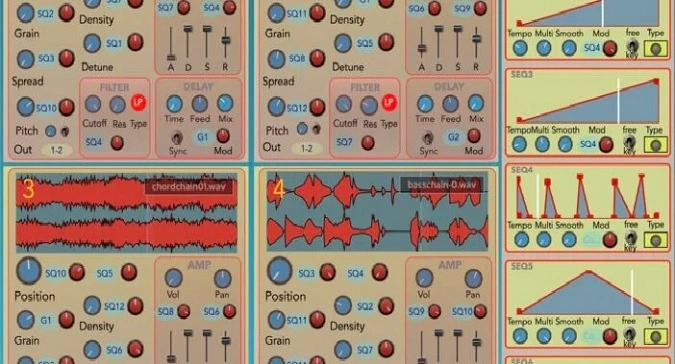
The redesigned interface separates main controls in blue from modulation parameters in red for improved visual clarity. A dedicated Master Control page provides quick per-voice adjustments without diving into individual voice panels.
Developed by Rick Taylor as an open-source project (GPL-3.0), the plugin is actively maintained with regular updates. Samples of three seconds or longer are recommended to avoid audio dropouts.
Video Preview

Tips
- Use longer samples (3 seconds or more) to avoid crashes and audio dropouts.
- Experiment with the drone button to create sustained ambient textures.
- Utilize the 12 modulation sequencers to add movement and complexity to your sounds.
- Adjust the buffer size to 512 or higher in Logic Pro to prevent glitchy playback.
- Explore the crossfade and round-robin modes for more dynamic and evolving sounds.
- Take advantage of the open-source nature of the plugin to customize and tweak it to your needs.
- Use the dedicated filter and amp envelope per voice to shape your sounds precisely.
- Combine different granular parameters like density, spread, and detune for unique soundscapes.
Frequently Asked Questions
What minimum sample length should I use with Oi, Grandad!?
The developer recommends using audio samples of three seconds or longer. Shorter files can cause crashes or audio dropouts, particularly at smaller grain sizes. This is documented in the plugin's known limitations.
Are version 1 presets compatible with version 2?
Version 2 is approximately 80% compatible with version 1 presets. Some parameters changed with the engine redesign, so certain presets may need manual adjustment after loading. Version 2.3 introduced an entirely new granular engine that further changes compatibility.
Does Oi, Grandad! support Apple Silicon Macs natively?
Yes. The macOS builds run natively on both Apple Silicon and Intel processors. The plugin is available as both AU and VST3 formats for macOS, with separate downloads for each format on the GitHub releases page.
Can I use Oi, Grandad! for melodic or tonal work, or is it only for textures?
While it excels at textural sound design, the pitch quantization feature added in version 2 enables melodic use. You can lock grains to fixed pitches or scale-based quantization, making it viable for tonal granular patches alongside its ambient strengths.