Oldigy

Key Features
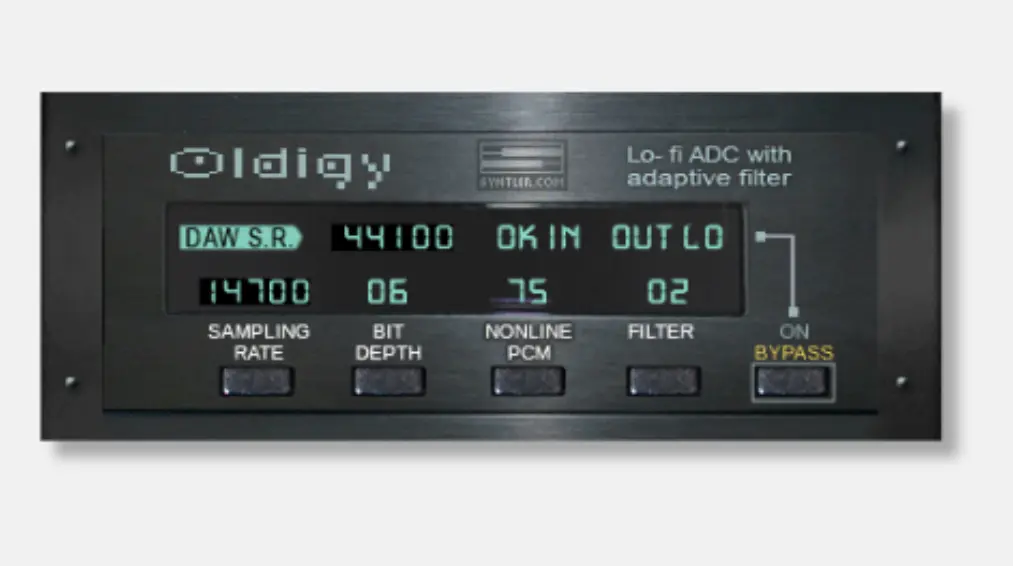
- Adjustable sampling rate from 3,675 Hz to 22,050 Hz (or 4,000-24,000 Hz at 48/96 kHz), going far below standard downsampling for extreme lo-fi effects
- Selectable bit depth from 4 to 12 bits, covering crunchy retro game console tones through subtle vintage sampler coloration
- Non-linear PCM companding control (0-100% in 25% steps) that mimics real vintage A/D converter behavior for authentic digital character
- Adaptive filter that softens digital artifacts based on input signal level, smoothing harsh aliasing without losing lo-fi texture
- Stereo processing with bypass toggle, upgraded from the original Oldigy-T mono plugin
- Available in VST2 (32-bit and 64-bit), VST3, and AU formats for Windows and macOS
Description
Oldigy by Syntler emulates the sound of low-resolution digital systems, going beyond basic bit-crushing to recreate the character of vintage samplers, game consoles, and early digital hardware. Version 1.22 replaced the original mono Oldigy-T plugin with stereo processing and adjustable sample rate control.
The sampling rate control adjusts from 3,675 Hz to 22,050 Hz at 44.1/88.2 kHz host rates, or 4,000 Hz to 24,000 Hz at 48/96 kHz host rates. Bit depth is selectable from 4 to 12 bits, covering everything from crunchy 4-bit game console tones to subtler 12-bit vintage sampler coloration.
The non-linear PCM control introduces companding (compress-expand) into the signal path, mimicking how real vintage hardware handled quantization. Adjustable from 0 to 100 percent in 25-percent increments, it increases digitization accuracy at low signal levels while decreasing it at high levels, improving the signal-to-noise ratio in a way unique to actual vintage converters.
An adaptive filter softens digital artifacts based on the input signal level, smoothing harsh aliasing without removing the lo-fi character entirely. Users on Plugins4Free describe Oldigy as having "one of the smoothest lowbit sounds in the market."
Gearnews highlights that Oldigy delivers more sonic variety than a standard bitcrusher, positioning it for producers seeking authentic lo-fi textures from the heyday of digital audio. It runs on Windows 7+ and macOS 10.8+ in VST2 (32/64-bit), VST3, and AU formats.
Video Preview

Frequently Asked Questions
What are some free bitcrusher plugins?
Popular free bitcrushers include Oldigy by Syntler, Tritik Krush, TAL-Bitcrusher, Kilohearts Bitcrush, and dblue Crusher. Oldigy stands out with its non-linear PCM companding and adaptive filtering, which recreate actual vintage converter behavior rather than just reducing bit depth.
Is bitcrushing similar to distortion?
Bitcrushing is a form of digital distortion that works by reducing bit depth and sample rate, creating quantization noise and aliasing artifacts. Traditional distortion clips the waveform, while bitcrushing degrades the digital resolution itself. Oldigy combines both approaches with its bit reduction, sample rate control, and non-linear PCM processing.
What is the difference between Oldigy and Oldigy-T?
Oldigy (version 1.22) replaced the original Oldigy-T in Syntler's product line. The upgrade added stereo processing (Oldigy-T was mono only), sampling rate selection, macOS support with AU format, and 64-bit compatibility. The core bit-crushing and non-linear PCM features carry over from Oldigy-T.
What formats and platforms does Oldigy support?
Oldigy supports VST2 (32-bit and 64-bit), VST3 (64-bit), and Audio Units (64-bit) on Windows 7 or later and macOS 10.8 Mountain Lion or later. Installation requires placing the plugin files in the standard VST3, VST2, or AU directories for your operating system.
How does Oldigy's non-linear PCM work?
The non-linear PCM control adds companding (compression-expansion) to the signal processing chain. The input signal is compressed before digitization and expanded afterward, increasing accuracy at low signal levels while decreasing it at high levels. This improves the signal-to-noise ratio and mimics how real vintage A/D converters handled quantization, adjustable from 0 to 100 percent.