Stage
Key Features
- Seven stereo width modes (Narrow, Mono, Normal, Stereo, Wide, Wider, Super Wide) for precise stereo field control from collapsed mono to expansive imaging
- Built-in gain staging control with a dedicated volume slider for maintaining optimal signal levels through the mix chain
- Smooth stereo width transitions from 0% to 200% without audible artifacts or unpredictable jumps between settings
- Pan (balance) control for precise signal placement within the stereo field alongside width adjustments
- Mono-compatible stereo processing that preserves mix translation on mono playback systems like smartphones and club speakers
- Factory preset library with support for saving and recalling custom configurations in .rdg format
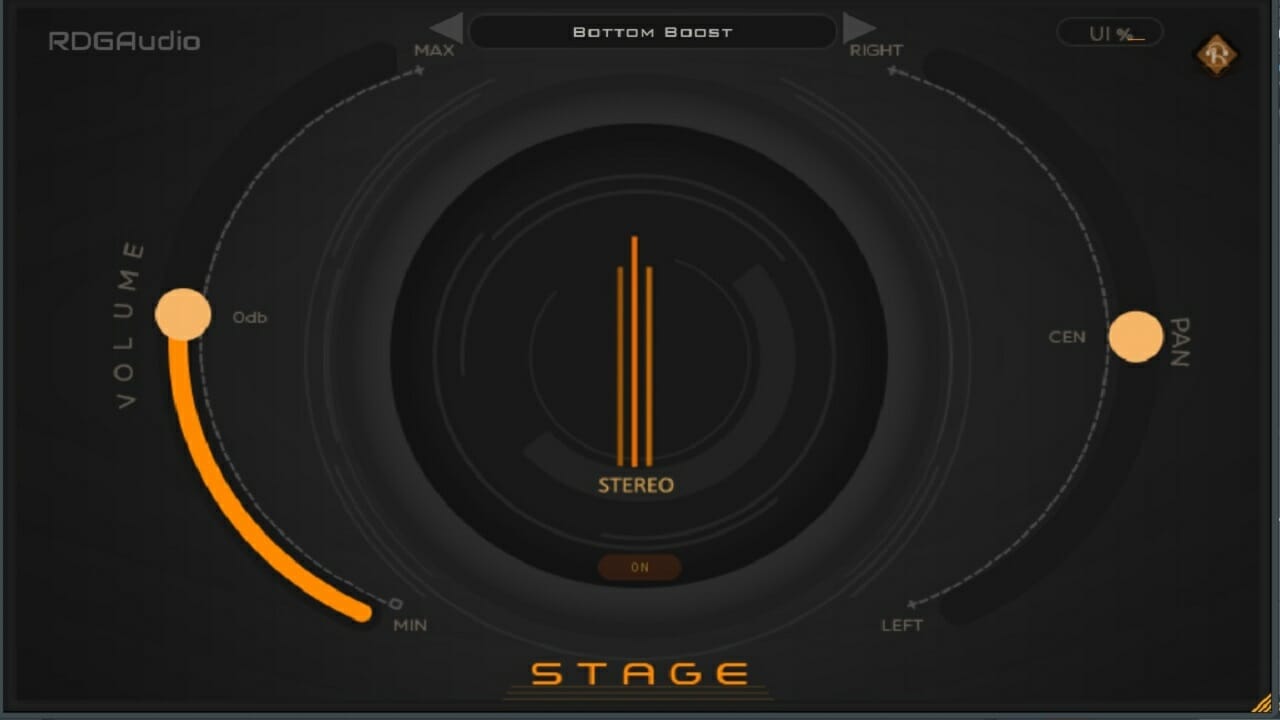
- Minimal three-control interface (volume, mode, pan) for fast workflow without complex menus
Description
Stage by RDGAudio is a gain staging and stereo enhancement plugin that combines volume control, stereo width manipulation, and panning into a single streamlined interface. Developed by Rudra Ghosh of Refined Digital Group in India, it delivers seven distinct stereo modes ranging from Narrow through to Super Wide.
The plugin's stereo width progression moves smoothly from 0% to 200%, with transitions between settings that remain predictable and artifact-free. This makes it particularly useful for placing instruments precisely within the stereo field without introducing phase issues that plague many stereo wideners.
A dedicated pan (balance) control complements the width modes, letting you position signals at exact locations on the sound stage. The combination of gain staging and stereo imaging in one window saves valuable screen real estate compared to running separate utility plugins.
Stage ships with factory presets covering common mixing scenarios, and supports saving custom configurations in the .rdg preset format. The interface keeps things minimal with just three controls — volume slider, mode selector, and pan knob — making it quick to dial in settings without menu diving.
The plugin maintains solid mono compatibility across all width settings, which is critical for mixes that need to translate to mono playback systems like smartphones and club PAs. It is available as a 64-bit AU and VST3 plugin for both macOS and Windows.
Video Preview

Frequently Asked Questions
What is the difference between the seven stereo modes in Stage?
The modes control the stereo width progressively from fully collapsed (Narrow/Mono) through natural (Normal/Stereo) to increasingly expansive imaging (Wide, Wider, Super Wide). The transition is smooth and goes from 0% to 200% stereo width, so you can find the exact amount of spread that fits your mix.
Does Stage introduce phase issues when widening the stereo image?
Stage maintains solid mono compatibility across all width settings. This means your mix will still translate cleanly when summed to mono on playback systems like smartphones, Bluetooth speakers, and club PA systems.
Can Stage be used for gain staging and stereo enhancement at the same time?
Yes, that is exactly what Stage is designed for. The volume slider handles gain staging while the mode selector and pan knob control stereo width and positioning, all within a single plugin window. This saves CPU and screen space compared to using separate utility plugins.
What preset format does Stage use?
Stage uses the .rdg preset format for saving and loading custom configurations. It also comes with factory presets for common mixing scenarios, so you can start with a template and adjust from there.