
Voiks
Key Features
- Record audio or import WAV, AIFF and FLAC files for keyboard playback
- Automatic root-note detection with manual pitch adjustment
- Loop, reverse and U-Turn playback with draggable sample boundaries
- Stereo recording up to 30 seconds with overdubbing and embedded patch audio
- ADSR envelope, modulation, chorus, low-pass filter and tilt EQ
- Per-note fuzz and pitch-dependent echo with adjustable converter character
Description
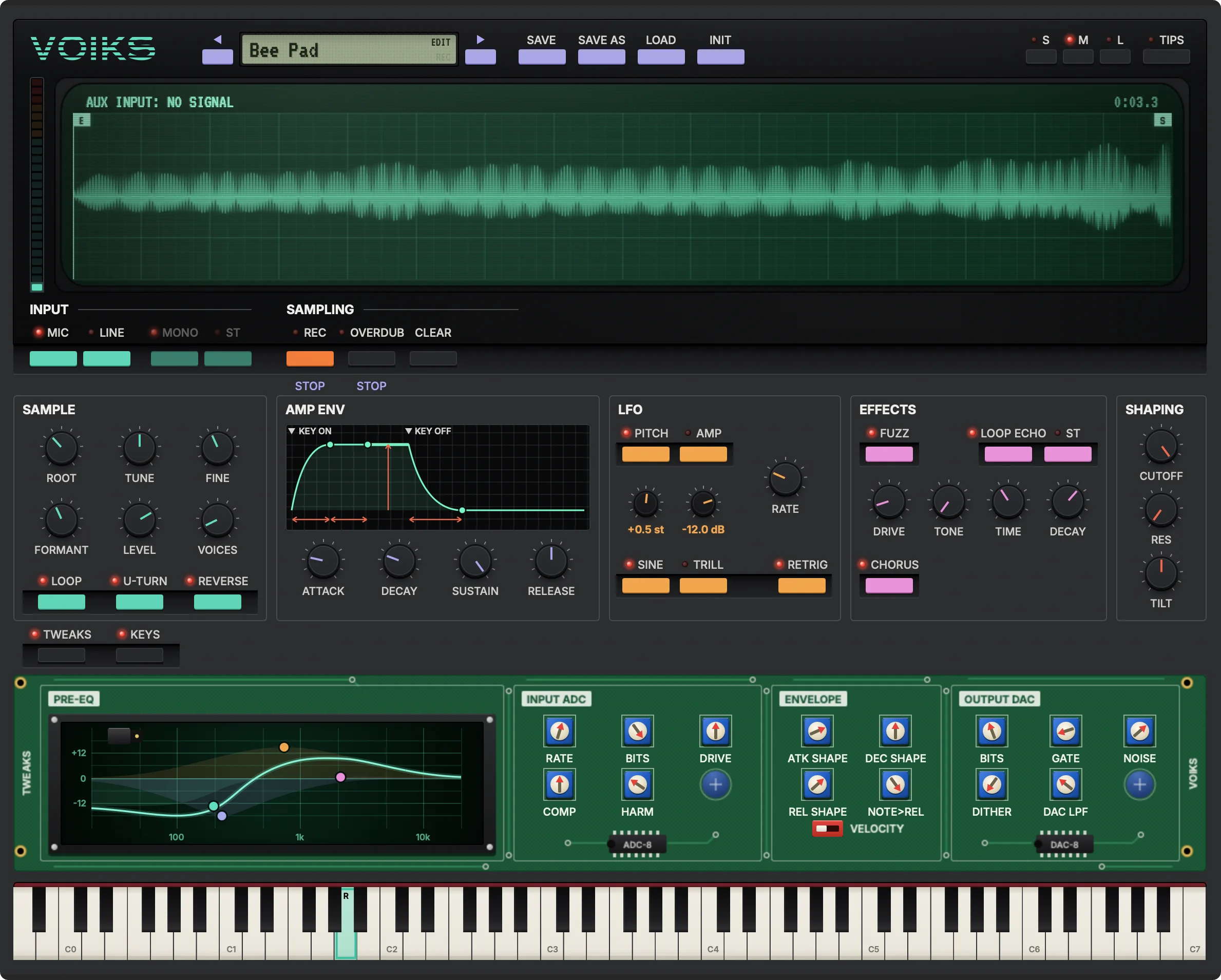
Voiks is a lo-fi sampler plugin by StageBox Software that turns a recorded or imported sound into an instrument you can play across a keyboard. Inspired by the Yamaha VSS-30, it pairs the immediacy of a toy sampling keyboard with an adjustable 8-bit signal path.
Record through an audio interface or drag a WAV, AIFF or FLAC file into the waveform display. Voiks detects the root note automatically, with manual pitch adjustment available if the result needs correcting; in a DAW, recording requires routing audio to the instrument's sidechain input.
Drag the sample boundaries to select a section, then use looping, reverse or U-Turn playback to change its movement. Stereo sampling, recordings up to 30 seconds and overdubbing extend the short-sample workflow, and saved patches include their audio.
An ADSR envelope, pitch and amplitude modulation, chorus, low-pass filter and tilt EQ offer ways to shape a sound. Echo follows playback speed across the keyboard, while fuzz works on individual notes; deeper settings adjust the microphone coloration, sample rate, bit depth and converter character.
Bedroom Producers Blog praised the quick sampling workflow but found the bitcrushing different from the character of old toy keyboards. Voiks is available for macOS and Windows, and the developer asks for an email address to access its installers.
Frequently Asked Questions
How do I record into Voiks in a DAW?
Route the audio you want to capture to the instrument’s sidechain input. You can also drag a WAV, AIFF or FLAC file into the waveform display.
Can Voiks save my samples with a patch?
Yes. Saved patches include the audio, so you do not need to keep a separate sample file alongside each patch.
Which systems and formats does Voiks support?
The developer lists a universal macOS build for macOS 11 or later, with Audio Unit, VST3 and AAX. Windows 10 or later is supported in 64-bit VST3.
Does downloading Voiks require an email address?
Yes. The developer requests an email address and consent to occasional StageBox Software product emails before granting access to downloads.


