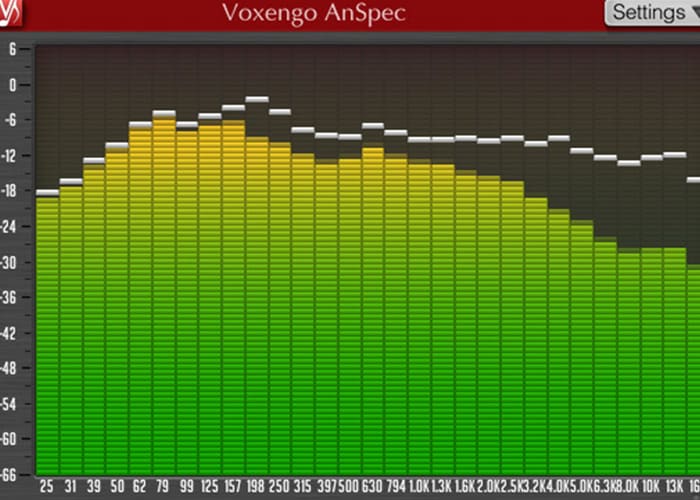
Voxengo AnSpec
Key Features
- 1/3-octave analog-style band display — 31 fixed bands that mirror the natural perceptual grouping of frequencies, distinct from FFT-based analyzers
- Spectrum slope control — apply a tilt correction so pink noise reads as a flat line, matching standard analog RTA reference behavior
- Selectable band count and adjustable display range for flexible frequency monitoring across different mixing contexts
- Stereo and mono analysis with per-channel visualization and dedicated peak level indication
- Zero processing latency — insert anywhere in your signal chain without introducing timing offsets
- Multiple color schemes (beige, gray, blue, black, navy) with Retina/HiDPI support and a fully resizable interface
- 64-bit floating point processing at all sample rates — VST, VST3, AU, and AAX compatible on Mac and Windows
Description
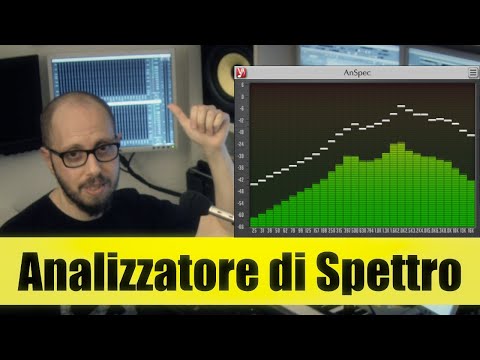
Voxengo AnSpec is a free 1/3-octave analog spectrum analyzer plugin that brings the smooth visual character of classic hardware RTAs into your DAW. Rather than the sharp, FFT-style displays found in most digital analyzers, it renders frequency content through the warmer, more gradual transitions of vintage 1/3-octave band analysis — making tonal balance easier to read at a glance during mixing and mastering.
Each of its 31 bands corresponds to a standard octave fraction, which is how physical analog spectrum analyzers have always measured audio. This approach trades high-frequency resolution for perceptual readability: the display shows how your ear naturally groups frequencies, not just raw spectral data.
Peak level indicators sit alongside the band display so you can catch transient spikes without switching to a separate metering tool. Spectrum slope control lets you tilt the display reference so flat-spectrum pink noise reads visually flat — a workflow borrowed directly from hardware measurement setups.
The interface is fully resizable with multiple color schemes (beige, gray, blue, black, and navy), Retina and HiDPI support, and no processing latency. Compatible with all major DAWs via VST, VST3, AU, and AAX on Mac and Windows, it works in stereo or mono at any sample rate.
Video Preview

Frequently Asked Questions
How does AnSpec differ from Voxengo SPAN?
SPAN uses FFT (Fast Fourier Transform) analysis, which gives you continuous high-resolution frequency data but can look busy and clinical. AnSpec uses 1/3-octave band analysis — the same method as classic hardware RTAs — which results in a smoother, more gradual display with 31 fixed bands. SPAN is better for precise mixing work; AnSpec is better if you want a quick tonal reference that reads more like a hardware analyzer.
Does AnSpec have peak hold?
Yes. AnSpec includes dedicated peak level indication alongside the band display. This lets you see both the sustained spectral balance and transient peaks without needing a separate metering plugin in the chain.
What is spectrum slope control and when should I use it?
Spectrum slope control lets you apply a tilt to the visual reference line on the display. In practice, this means you can set it so that pink noise — which has equal energy per octave and is the standard reference for balanced audio — appears as a flat horizontal line rather than sloping downward. It's a workflow borrowed directly from hardware measurement setups and is particularly useful during mastering or room calibration sessions.
Does AnSpec work in mono as well as stereo?
Yes. AnSpec supports both stereo and mono analysis. You can load it on any channel in your DAW — a stereo bus, a mono instrument track, or the master output — and it will display frequency content accurately in either mode.