
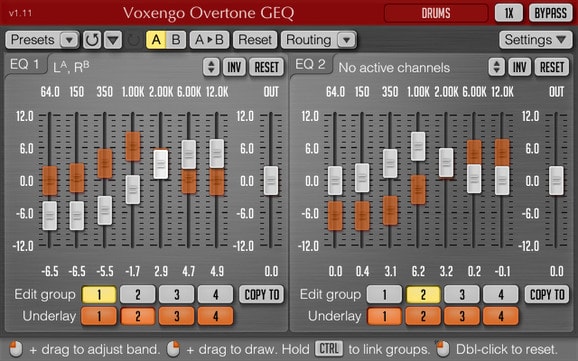
Voxengo Overtone GEQ
Key Features
- 7-band harmonic graphic EQ with a dedicated harmonic enhancement module per band — each boost or cut simultaneously adds overtone coloration
- Up to 8 input/output channels with extensive internal routing and channel grouping for complex multi-channel workflows
- Mid/side processing for precise stereo control over center and side content
- Up to 8x oversampling for cleaner high-frequency processing when CPU headroom is available
- Zero latency processing — safe for recording, real-time monitoring, and mixing
- Resizable interface with multiple color schemes, Retina/HiDPI support, and two EQ display views
- Full session toolset: preset manager, A/B comparisons, undo/redo history, and all sample rates supported
Description
Voxengo Overtone GEQ is a free 7-band harmonic graphic equalizer that does something most EQs can't: it adds harmonic coloration alongside every adjustment you make. Each of the seven bands has its own harmonic enhancement module, so boosting or cutting a frequency simultaneously introduces subtle overtones.
Designed for broad tonal shaping on mixes and sub-mixes, Overtone GEQ handles stereo, mono, mid/side, and surround configurations up to 8 channels. Internal channel routing and channel grouping give engineers precise control over how signal flows — two graphic EQ display modes let you work at whatever level of detail the session demands.
The plugin features up to 8x oversampling for cleaner high-frequency processing, though this comes at a higher CPU cost — something to factor in on dense sessions. Zero processing latency keeps it safe for tracking and real-time monitoring.
A full session toolset rounds things out: preset manager, A/B comparisons, undo/redo history, and contextual hints throughout the interface.
Overtone GEQ runs natively on Apple Silicon and supports macOS Sonoma, Sequoia, and Tahoe, as well as Windows in both 32- and 64-bit hosts. The interface is resizable with Retina/HiDPI support and ships in multiple color schemes.
Video Preview

Frequently Asked Questions
Does the harmonic enhancement make it sound analog or lo-fi?
Not exactly lo-fi — it's more subtle than that. Each band adds layered overtones proportional to the amount of EQ applied, which gives the sound a fuller, more complex character. The effect ranges from barely perceptible to noticeably colored depending on how aggressively you're boosting. It's closer to what engineers call 'tape warmth' than any kind of intentional degradation.
Is it CPU-heavy?
Voxengo explicitly notes that Overtone GEQ puts a comparably high processing load on the CPU, especially on mixes and sub-mixes where it was designed to be used. Enabling higher oversampling (up to 8x) increases the load further. On modern machines it's typically fine as a master bus insert, but be mindful when stacking multiple instances on a dense session.
Can it replace an API 560 or other hardware graphic EQ?
It covers similar territory — fixed-band graphic EQ with inherent coloration — but in a different way. Hardware 500-series graphic EQs color the signal through transformer saturation and analog circuit behavior. Overtone GEQ introduces overtones algorithmically per band. Both approaches add harmonic richness alongside EQ shaping, making Overtone GEQ a genuinely useful no-cost alternative for producers who don't have access to hardware.
Does it work in mono and surround, or just stereo?
Overtone GEQ supports mono, stereo, mid/side, and multi-channel configurations up to 8 channels (host-dependent). The internal channel routing gives you control over how signal moves between bands and channels, which is especially useful for 5.1 or 7.1 surround work.


