
Wolf Shaper
Key Features
- Spline-based graph editor with four curve types for drawing custom distortion transfer functions
- Warping algorithms dynamically reshape the transfer curve in real time via two automatable Warp knobs
- Uni and Bi modes toggle between symmetrical and asymmetrical waveshaping for different harmonic characters
- Up to 16x oversampling to eliminate aliasing artifacts even with extreme curve shapes
- Pre, Post, Wet, and Center controls for precise gain staging, mix blending, and DC offset removal
- Open-source (GPL-3.0) with cross-platform support for Windows, macOS, and Linux
- Lightweight and CPU-efficient — manageable resource usage even with oversampling enabled
Description
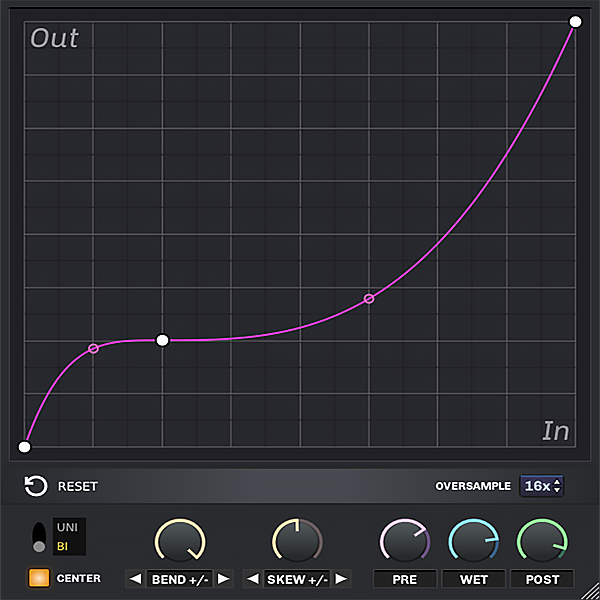
Wolf Shaper is an open-source waveshaper plugin by Patrick Desaulniers that lets you draw custom distortion transfer curves using a spline-based graph editor. It ships with four curve types and a set of warping algorithms that dynamically reshape the graph in real time.
The graph editor is the centerpiece: right-click to add vertices, drag them into position, and adjust tension handles to sculpt the exact distortion shape you want. Uni and Bi modes switch between symmetrical and asymmetrical waveshaping, opening up everything from gentle saturation to aggressive foldback distortion.
Up to 16x oversampling keeps aliasing artifacts under control, even with extreme curve shapes. BPB reviewer William Frady calls it "a great little distortion plugin" capable of producing inventive distortions worth experimenting with.
The control set is straightforward: Pre and Post knobs handle input and output gain, Wet sets the dry/wet mix, and Center removes DC offset from the processed signal. Two automatable Warp knobs let you morph the transfer curve during playback for evolving textures.
Reddit users on r/edmproduction consistently recommend Wolf Shaper as the cleanest spline-based waveshaper available, with one user updating their post specifically to endorse it after testing Melda and other alternatives. The plugin is particularly popular with bass sound designers and trance producers.
Wolf Shaper v1.0.2 is available for Windows, macOS (universal binary), and Linux in VST3, CLAP, and LV2 formats. The Windows download is approximately 5 MB and the macOS download is approximately 6 MB.
Video Preview

Frequently Asked Questions
What plugin formats does Wolf Shaper support?
Wolf Shaper v1.0.2 supports VST3, CLAP, and LV2 plugin formats. Earlier versions also supported VST2 and DSSI. It runs on Windows (64-bit), macOS (universal binary for Intel and Apple Silicon), and Linux.
What is the difference between Uni and Bi mode in Wolf Shaper?
Uni mode applies asymmetrical waveshaping, processing the positive and negative halves of the audio signal differently. Bi mode applies symmetrical waveshaping, mirroring the transfer curve for both halves. Switching between modes produces noticeably different harmonic content from the same curve shape.
Does Wolf Shaper cause aliasing artifacts?
Wolf Shaper includes oversampling up to 16x specifically to reduce aliasing. With oversampling disabled, aggressive curves can introduce audible aliasing on high-frequency content. Enabling 4x or higher oversampling eliminates most artifacts with only a modest increase in CPU usage.
How do the Warp knobs work in Wolf Shaper?
The two Warp knobs apply warping algorithms (bend, skew, and other transformations) to dynamically alter the shape of the transfer curve. Both knobs are fully automatable, which means you can modulate the distortion character over time directly from your DAW's automation lanes.


