
WSTD DLAY
Key Features
- Delay time from 50ms to 5000ms covering everything from tight slapback to expansive ambient trails
- DAW tempo sync with flexible divisions ranging from 1/6th to 6x the project speed
- Cross modulation control that morphs between standard stereo, inverted stereo, and ping-pong delay modes
- Feedback control that ranges from subtle repeats to self-oscillating chaos for creative sound design
- Wet/dry mix knob for seamless use as either a send or insert effect
- Open-source under GPL v3 with no DRM restrictions
- Cross-platform support for Windows, macOS, and Linux in VST, VST3, CLAP, and LV2 formats
Description
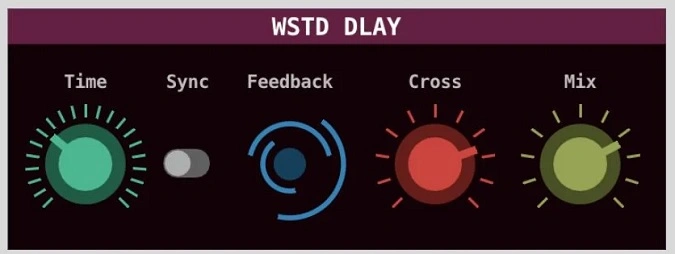
WSTD DLAY is a straightforward delay effect plugin by Wasted Audio, designed to deliver essential echo processing without unnecessary complexity. Built as the compact sibling to the paid WSTD DL3Y, it distills the core delay experience into four controls that cover a wide range of creative territory.
The delay time ranges from 50ms up to a generous 5000ms, with an optional DAW sync mode that locks repeats to your session tempo at divisions from 1/6th up to 6x speed. This makes it equally suited for tight slapback echoes and long, atmospheric trails.
The Cross control blends the left and right delay channels, moving smoothly from standard stereo through inverted imaging to full ping-pong mode. Pushing the feedback into higher ranges produces self-oscillating chaos that works well for buildups and transitions.
With a single mix knob rounding out the interface, WSTD DLAY works seamlessly as either a send or insert effect. The plugin is open-source under the GPL v3 license and ships without any DRM.
Available in VST, VST3, CLAP, and LV2 formats for Windows, macOS, and Linux, it runs as a 64-bit plugin across all three platforms.
Video Preview


Tips
- Experiment with different delay times to find the perfect echo effect for your track.
- Use the time synchronization feature to create rhythmic delay patterns that match your project's tempo.
- Adjust the feedback control to add more depth and complexity to your delay effects.
- Try the cross modulation control to create unique stereo effects, such as ping-pong delays.
- Use the mix knob to blend the delay effect with your original signal, either as a send or an insert effect.
- Combine WSTD DLAY with other effects to create more intricate soundscapes.
- Explore the open-source code to customize and improve the plugin according to your needs.
Frequently Asked Questions
Can WSTD DLAY sync its delay time to my DAW's tempo?
Yes. Activating the sync selector locks the delay time to your session tempo. You can choose divisions ranging from 1/6th up to 6x the project speed, which makes it easy to create rhythmic delay patterns that stay in time with your track.
How does the Cross modulation control work?
The Cross knob blends the left and right delay channels. At the default position you get standard stereo delay. Turning it further morphs through inverted stereo (swapping left and right repeats) all the way to a full ping-pong effect where echoes bounce between speakers.
Is WSTD DLAY related to WSTD DL3Y?
WSTD DLAY is the compact, streamlined sibling of WSTD DL3Y. While DL3Y adds three-band frequency splitting and independent delay controls per band, DLAY focuses on a single delay line with the same core controls. Both are made by Wasted Audio.
Does WSTD DLAY support Linux?
Yes. WSTD DLAY is one of the relatively few delay plugins with native Linux support. It ships as a 64-bit build for Linux x86_64 alongside the Windows and macOS versions, available in VST, VST3, CLAP, and LV2 formats.


