
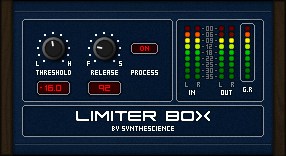
Limiter Box

Key Features
- Brickwall limiting that prevents output from exceeding a selectable threshold
- Fully automatable parameters for real-time threshold and release adjustments
- 32 preset slots with several factory presets included out of the box
- Intentional soft-clipping character at extreme settings for subtle harmonic coloring
- Ultra-lightweight at 1.2 MB with minimal CPU overhead
- Simple drag-and-drop installation by copying the DLL to your VST folder
- Clean, no-frills interface focused on fast workflow without menu diving
Description
Limiter Box by Synthescience is a straightforward brickwall limiter designed to prevent audio from exceeding a set threshold. It squeezes the dynamic amplitude of incoming material so your tracks stay under control without unwanted clipping.
The plugin ships with a handful of presets and supports up to 32 user-stored settings, making it easy to recall your preferred configurations across sessions. Every parameter is fully automatable, so you can adjust the threshold in real time during a mix.
Built with SynthEdit, Limiter Box keeps the interface minimal: a threshold control and a release knob are all you need to shape the dynamic behavior. Users on Plugins4Free rate it 4.8 out of 5, praising its simplicity and predictable results.
An intentional quirk sets this limiter apart from more clinical tools. Low threshold values combined with very short release times introduce a subtle clipping characteristic that the developers chose to keep as part of the plugin's sonic identity.
Limiter Box is a Windows-only 32-bit VST effect weighing in at just 1.2 MB. Installation requires nothing more than copying the DLL into your VstPlugins folder.
Frequently Asked Questions
Why does Limiter Box clip at very low threshold settings?
This is an intentional design choice by Synthescience. When you combine low threshold values with very short release times, the plugin introduces a subtle clipping behavior. The developers decided to leave this characteristic in rather than remove it, treating it as part of the plugin's sonic personality.
Does Limiter Box work in 64-bit DAWs?
Limiter Box is a 32-bit VST plugin. To use it in a 64-bit DAW, you will need a bridging tool such as jBridge or 32 Lives. Without a bridge, most modern 64-bit hosts will not recognize the DLL.
Can I automate Limiter Box parameters inside my DAW?
Yes. All parameters in Limiter Box are fully automatable. You can draw automation lanes for threshold and release in any DAW that supports VST automation, allowing dynamic control throughout your arrangement.
How do I install Limiter Box?
Unzip the downloaded file and copy the DLL into your DAW's VstPlugins folder. No installer or registration is required. After restarting your DAW or rescanning plugins, Limiter Box should appear in your effects list.


