Progressive House Template 2
Audio Preview
Description
Progressive House Template 2 by Kevin Lee is a detailed project file for Logic Pro X users.
This template offers a solid base for creating high-quality progressive house tracks.
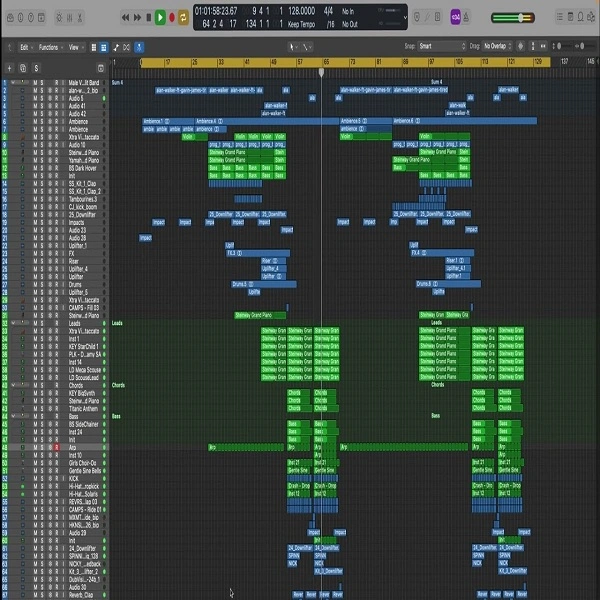
It includes a well-organized arrangement with clearly labeled sections such as intro, build-up, drop, and outro, showing producers how a professional track is built from start to finish.
The template features various audio files, including drum loops, basslines, synth leads, and atmospheric effects, all chosen to fit the progressive house genre.
Additionally, the template uses stock plugins from Logic Pro X, ensuring that users can fully utilize the template without needing additional third-party plugins.
The media folder within the template contains all the necessary audio files, categorized for easy access.
This organization helps streamline the workflow, allowing producers to quickly find and manipulate the sounds they need.
The project file backups and undo data allow users to experiment freely, knowing they can always revert to previous versions if needed.
Video Preview

Tips
- Customize the MIDI Data: Use the included MIDI files to create your own unique melodies and harmonies. Experiment with different chord progressions and lead lines to make the track your own.
- Adjust the Stock Plugins: The template uses Logic Pro X's stock plugins, which are highly versatile. Tweak the settings on the EQs, compressors, and reverb to match your desired sound. This will help you learn how to use these tools effectively within your own projects.
- Experiment with Arrangement: Use the template's arrangement as a guide, but don't be afraid to change the structure. Try extending the build-up, adding a second drop, or creating a more dynamic outro to give your track a unique flow.
- Layer Additional Sounds: Enhance the depth and richness of your track by layering additional synths, pads, and effects. This can help fill out the mix and add complexity to your production.
- Analyze the Mix: Study the mixing techniques used in the template. Pay attention to how different elements are panned, the use of sidechain compression, and the overall balance of the mix. Apply these techniques to your own tracks to achieve a professional sound.