Tracking Template
Key Features
- Pre-configured vocal recording session ready to use immediately — no setup required
- 100% stock Logic Pro X plugins: EQ, compression, reverb, and delay all pre-dialed
- Optimized signal routing and monitoring setup designed for low-latency vocal tracking
- Compatible with Logic Pro X 10.4 and above
- Pre-defined signal paths minimize post-processing by capturing a polished sound at the source
- Track layout organized for efficient punch-in recording and comping
- Color-coded and labeled tracks for quick navigation during live sessions
Description
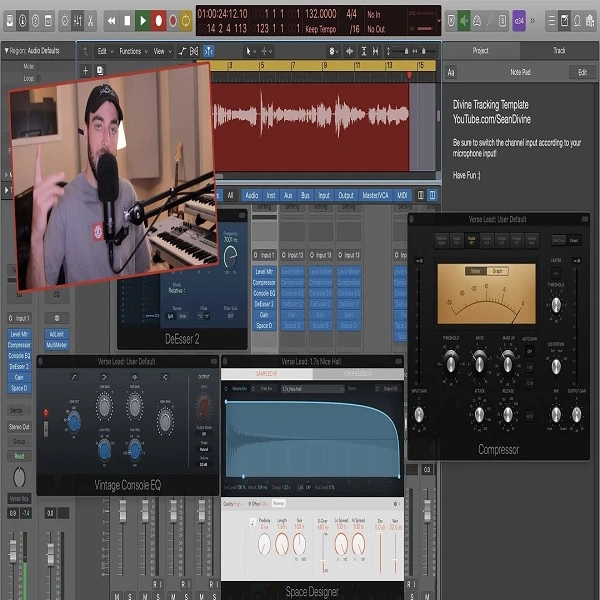
The Tracking Template by Sean Devine is a purpose-built Logic Pro X session designed specifically for vocal recording. Every track, bus, and plugin is already pre-configured so you can plug in a microphone and start capturing takes immediately — no setup, routing work, or plugin configuration required before your first recording pass.
The template uses only Logic Pro X's stock plugins: EQ, compression, reverb, and delay are all dialed in before you open the session. Signal routing is organized for clarity and speed, with predefined signal paths specifically designed to keep monitoring latency low and give singers a comfortable, natural-feeling headphone blend throughout live takes.
Compatible with Logic Pro X 10.4 and above, the template works without any third-party purchases or additional plugins. It's a reliable, consistent starting point for home studio owners and professional session engineers who track vocalists on a regular basis and want to skip the session-prep overhead entirely.
Video Preview

Tips
- Customize Plugin Settings: While the template comes with pre-configured plugin settings, we recommend tweaking the EQ and compression to suit the specific characteristics of your vocal performance. This ensures that the recording complements the unique tonal qualities of your voice.
- Utilize Track Stacks: The template includes track stacks for organizing different vocal takes and harmonies. Use these stacks to keep your session organized and to apply group processing to multiple tracks simultaneously.
- Adjust Reverb and Delay Sends: The template includes send tracks for reverb and delay effects. Adjust the send levels to taste, ensuring that the effects enhance the vocal without overwhelming it. Experiment with different reverb times and delay feedback settings to find the perfect ambiance for your track.
- Monitor with Low Latency Mode: Enable Logic Pro X's Low Latency Mode when recording to minimize any delay between the input signal and what you hear in your headphones. This is crucial for maintaining a natural performance feel.
- Save as a New Template: After making adjustments that suit your recording style, save the modified session as a new template. This allows you to start future projects with your personalized settings, streamlining your workflow even further.
Frequently Asked Questions
Does this template require any third-party plugins?
No. It uses only Logic Pro X's built-in plugins. EQ, compression, reverb, and delay are all from Logic's stock library, so the session loads cleanly on any Mac running Logic Pro X.
What is the minimum Logic Pro X version needed?
The template requires Logic Pro X 10.4 or higher. It is compatible with all later versions including the current Logic Pro release.
Can I use this template for instruments, not just vocals?
While the routing and processing are optimized for vocal tracking, the channel strip settings translate well to any acoustic source — acoustic guitar, room mics, overhead drum mics. You'd want to swap the vocal-specific EQ curve for one suited to the instrument.