Progressive House Template 2
Audio Preview
Key Features
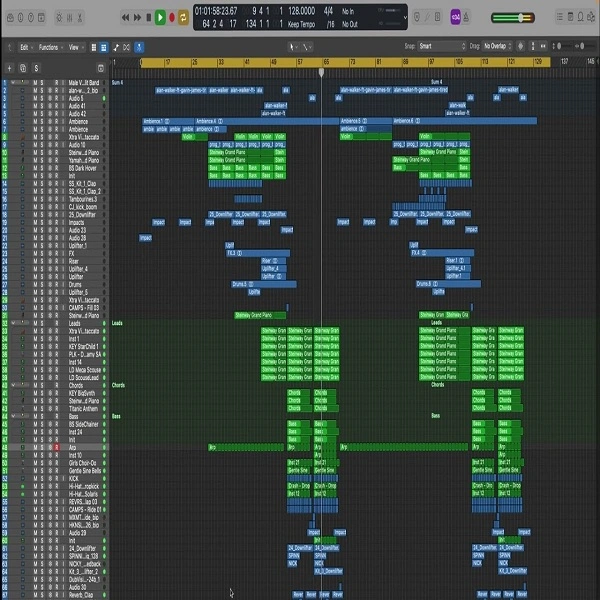
- Labeled arrangement sections: intro, build-up, drop, and outro for full song structure study
- Genre-appropriate audio content including drum loops, basslines, synth leads, and atmospheric effects
- Built entirely on Logic Pro X stock plugins — no third-party purchases required
- Organized media folder with all audio files categorized for fast browsing
- Project backups and undo data included for safe experimentation
- Professionally structured track layout for straightforward customization
- Useful as both an educational reference and a production starting point
Description
Progressive House Template 2 by Kevin Lee is a fully arranged Logic Pro X project file for producers studying the structure and sound of professional progressive house. The arrangement breaks down clearly into labeled intro, build-up, drop, and outro sections, showing exactly how a club-ready track moves through its emotional arc from the first bar to the last.
All audio content — drum loops, basslines, synth leads, and atmospheric effects — is selected specifically for the progressive house genre and sorted inside an organized media folder for fast browsing and swapping. The entire project runs on Logic Pro X's built-in instruments and effects, so nothing additional needs to be purchased or installed.
Project backups and undo history are included in the bundle, giving you a safety net while experimenting freely with arrangement edits and sound design choices. This makes it a practical production starting point as much as an educational reference.
Video Preview

Tips
- Customize the MIDI Data: Use the included MIDI files to create your own unique melodies and harmonies. Experiment with different chord progressions and lead lines to make the track your own.
- Adjust the Stock Plugins: The template uses Logic Pro X's stock plugins, which are highly versatile. Tweak the settings on the EQs, compressors, and reverb to match your desired sound. This will help you learn how to use these tools effectively within your own projects.
- Experiment with Arrangement: Use the template's arrangement as a guide, but don't be afraid to change the structure. Try extending the build-up, adding a second drop, or creating a more dynamic outro to give your track a unique flow.
- Layer Additional Sounds: Enhance the depth and richness of your track by layering additional synths, pads, and effects. This can help fill out the mix and add complexity to your production.
- Analyze the Mix: Study the mixing techniques used in the template. Pay attention to how different elements are panned, the use of sidechain compression, and the overall balance of the mix. Apply these techniques to your own tracks to achieve a professional sound.
Frequently Asked Questions
Does this template need any plugins beyond Logic Pro X?
No. The entire project uses only Logic Pro X's built-in instruments and effects. It will open and play back fully on any Mac running Logic Pro X without missing plugin warnings.
How is the media folder organized?
All audio files — loops, one-shots, and atmospheres — are sorted by type inside the project's media folder. This categorization makes it straightforward to swap individual elements without hunting through an unsorted sample library.
Can I export individual stems from this template?
Yes. Each track is independent and can be solo'd and bounced to a stem using Logic Pro X's Export Tracks as Audio Files function. This is useful if you want to remix or rearrange elements outside of the original template.