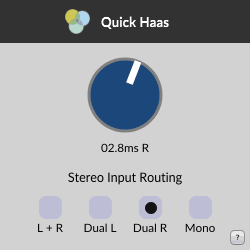
Quick Haas
Key Features
- Psychoacoustic Haas effect panning that creates more natural stereo positioning than traditional volume-based panning
- Precision delay adjustment from 0.01 to 19 ms, with tenth-of-a-millisecond resolution for transparent results
- Four input routing modes (mono, stereo, dual left, dual right) to handle any source signal configuration
- Minimalist single-knob interface that keeps the workflow fast and focused on a single creative decision
- Cross-platform support for macOS, Windows, and Linux with VST3, AU, and AAX format coverage
- Lightweight CPU footprint suited for use across multiple tracks in a mix session
Description
Quick Haas by Venn Audio is a psychoacoustic panning plugin that uses the Haas effect to position sounds across the stereo field. Instead of simple volume-based panning, it introduces a subtle delay between the left and right channels, creating a more natural sense of spatial placement that closely mimics how human hearing localizes sound sources.
The delay range spans from 0.01 to 19 milliseconds, with adjustments as fine as a tenth of a millisecond. In practice, most effective stereo positioning only needs delays below 2 ms, making the results transparent and phase-friendly at sensible settings.
Four input routing modes handle different signal types: mono, stereo, dual left, and dual right. The developer recommends mono routing or one of the dual modes when working with true stereo sources where left and right channels already differ.
The plugin works well on lead guitars and backing vocals where double-tracking is impractical but natural width is needed. It can also add subtle widening to centered vocals without pushing them out of focus, and it performs effectively on percussive elements like claps.
Updated to version 2.1.0 in October 2025, Quick Haas now supports macOS, Windows, and Linux in VST3, AU, and AAX formats. Always check your mix in mono after applying the effect to catch any phasing issues that stereo delay can introduce.
Video Preview

Frequently Asked Questions
What is the difference between Haas effect panning and normal panning?
Normal panning adjusts the volume balance between left and right channels. Haas effect panning instead delays one channel by a tiny amount (typically under 2 ms), which tricks your brain into perceiving a spatial location. The result sounds more natural and three-dimensional, closer to how you hear sounds in a real room.
Does the Haas effect cause phasing problems when the mix is played in mono?
It can. Any time you delay one channel relative to the other, collapsing to mono will cause some phase cancellation. The key is to use small delay values and always check your mix in mono after applying the effect. Subtle settings under 2 ms typically survive mono summing well.
Which input routing mode should I use for a mono vocal track?
Use the mono routing mode. This feeds the same signal to both sides before applying the Haas delay, giving the cleanest spatial result. The dual left or dual right modes are useful if you want to duplicate one channel of a stereo source, while stereo mode preserves the original left-right content.
What delay time should I start with for a natural-sounding pan?
Most effective panning only needs delays between 0.5 and 2 ms. Values above roughly 10 ms start to sound like a distinct echo rather than a spatial shift. Start around 1 ms and adjust by ear until the source sits where you want it in the stereo image.