Tracking Template
Description
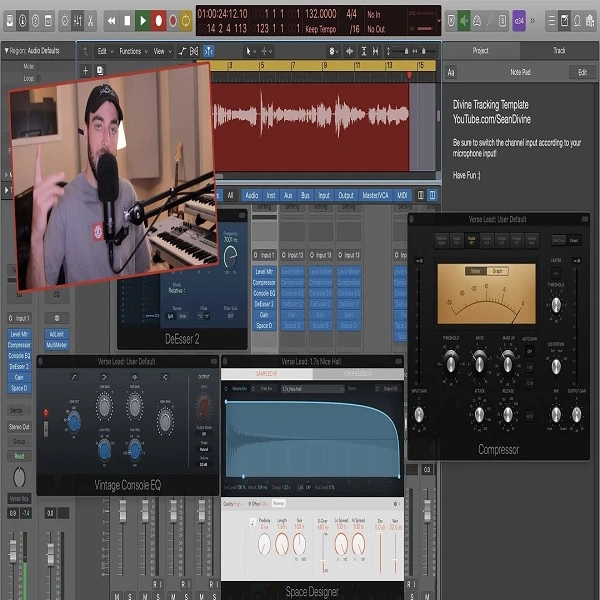
The Tracking Template by Sean Devine is crafted for vocal recording in Logic Pro X.
This template uses stock plugins to simplify the vocal tracking process, providing a professional and efficient workflow.
It includes pre-configured tracks, routing, and essential plugins such as EQ, compression, reverb, and delay, all set up to create a high-quality recording environment.
The template works with Logic Pro X version 10.4 and above, making it accessible for most users of this DAW.
The template features:Pre-configured tracks: Ready for immediate use with minimal setup, allowing users to start recording quickly.
Stock plugins: Uses Logic Pro X's built-in plugins, so no additional purchases are necessary.
Routing and signal flow: Set up for clarity and efficiency, with predefined signal paths that improve the recording process.
Plugin settings: Adjusted to provide a balanced and polished sound right from the start, reducing the need for extensive post-processing.
Video Preview

Tips
- Customize Plugin Settings: While the template comes with pre-configured plugin settings, we recommend tweaking the EQ and compression to suit the specific characteristics of your vocal performance. This ensures that the recording complements the unique tonal qualities of your voice.
- Utilize Track Stacks: The template includes track stacks for organizing different vocal takes and harmonies. Use these stacks to keep your session organized and to apply group processing to multiple tracks simultaneously.
- Adjust Reverb and Delay Sends: The template includes send tracks for reverb and delay effects. Adjust the send levels to taste, ensuring that the effects enhance the vocal without overwhelming it. Experiment with different reverb times and delay feedback settings to find the perfect ambiance for your track.
- Monitor with Low Latency Mode: Enable Logic Pro X's Low Latency Mode when recording to minimize any delay between the input signal and what you hear in your headphones. This is crucial for maintaining a natural performance feel.
- Save as a New Template: After making adjustments that suit your recording style, save the modified session as a new template. This allows you to start future projects with your personalized settings, streamlining your workflow even further.