VeeWidener
Key Features
- Psychoacoustic stereo widening based on the classic Haas-style delay technique used by engineers since the 1980s
- Multiple spatial effects from a single plugin: stereoizing, doubling, widening, and 3D placement depending on knob settings
- ADC-aware design that integrates with your DAW's Automatic Delay Compensation for phase-accurate processing
- Built-in output safety limiter capped at -0.1 dBFS to prevent speaker or hearing damage at any setting
- Can be driven into intentional hard-clipping distortion for creative sound design when fed an extremely hot signal
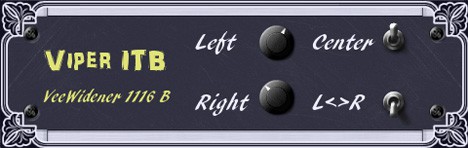
- Lightweight and CPU-efficient with an intuitive two-knob interface for fast workflow
Description
VeeWidener by Viper ITB is a stereo widener, doubler, and stereoizer plugin built around a classic psychoacoustic technique from the 1980s. By introducing a small delay between the left and right channels (under 40 ms), it tricks the brain into perceiving a wider stereo image from a mono source without hearing a distinct echo.
The plugin delivers a wide range of spatial effects depending on the source material — pads and strings take on an omnipresent quality, vocals and guitars gain a convincing doubled character, and drums and reverb sends become noticeably wider. Pushing the settings further can even create a sense of 3D placement, as though the source was captured with a spaced microphone pair.
VeeWidener leverages your DAW's Automatic Delay Compensation (ADC) to maintain sample-accurate timing across your session. This design choice means the plugin works best as a "set and forget" tool, since automating its parameters in real time would cause audible crackles due to latency changes.
A built-in safety limiter caps output at -0.1 dBFS regardless of input level, protecting both monitors and ears. Driving it with an extremely hot signal enables intentional hard-clipping distortion for creative sound design.
One important caveat: setting both knobs to the same value causes the channels to cancel each other out. Always offset the two controls to get usable stereo widening results.
Frequently Asked Questions
Why does VeeWidener cause crackles when I automate its controls?
VeeWidener relies on your DAW's Automatic Delay Compensation to function correctly. Changing parameters in real time alters the plugin's internal latency, which creates audible crackles. It is designed as a "set and forget" processor, so dial in your settings and leave them static during playback.
What happens if I set both knobs to the same value?
When both knobs share identical values, the left and right channels cancel each other out, producing silence or a very thin signal. Always offset the two controls to get usable stereo widening results.
Is VeeWidener mono-compatible?
Since VeeWidener uses a delay-based Haas effect rather than phase-based processing, collapsing the widened signal to mono can cause partial cancellation or comb filtering. Always check your mix in mono after applying the effect to ensure the sound translates well on single-speaker systems.