
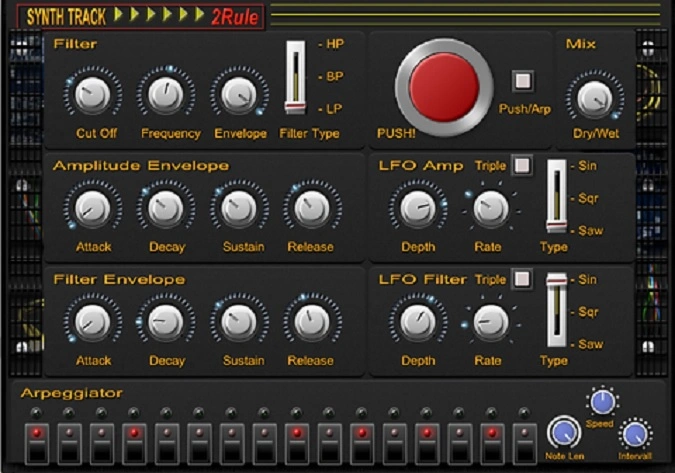
SynthTrack
Key Features
- 16-step sequencer with adjustable note length, speed, and interval for precise rhythmic pattern creation
- Multi-mode filter with high-pass, low-pass, and band-pass options for tonal shaping on every step
- Separate ADSR envelopes for both filter and amplitude, giving independent control over each modulation path
- Tempo-synced LFO with sine, square, and sawtooth waveforms for additional movement and animation
- One-shot "Push" button that triggers a single gate event for creative rhythmic cut-outs on demand
- 26 factory presets covering gated pads, tremolo effects, and sequenced filter patterns
- Dry/wet mix control (added in v1.01) for parallel blending with the original signal
Description
SynthTrack by 2Rule is a rhythmic effect plugin that transforms sustained audio into pulsing, sequenced patterns. It processes incoming audio through a 16-step sequencer, applying filter and amplitude envelopes to create gated pad sounds, trance-style chops, and arp-like rhythmic textures.
The sequencer syncs to your DAW's tempo and drives a multi-mode filter with high-pass, low-pass, and band-pass options. Separate ADSR envelopes for both the filter and amplitude sections give you precise control over each step's tonal shape and volume contour.
An LFO section offers sine, square, and sawtooth waveforms for additional modulation, all tempo-synced to keep everything locked to the grid. The one-shot "Push" button triggers a single gate event on demand, useful for creating isolated rhythmic cut-outs during a performance or arrangement.
SynthTrack ships with 26 presets covering rhythmic gating, tremolo-style effects, and sequenced filter sweeps. The v1.01 update added 64-bit Windows support and a dry/wet mix control, addressing the original release's lack of parallel blending.
Bedroom Producers Blog described SynthTrack as "a deluxe tremolo plugin that gives you control of the tonal properties," noting its effectiveness at turning static pads into animated rhythmic parts. It runs as a VST plugin on both Windows and macOS.
Video Preview


Tips
- Use the 16-step sequencer to create complex rhythmic patterns by adjusting the note length, speed, and interval settings.
- Experiment with the different filter types (high-pass, low-pass, band-pass) to shape the tonal characteristics of your audio.
- Utilize the amplitude envelope and LFO sections to add dynamic modulation to your sounds.
- Try the "Push" button for one-shot gate effects to create unique rhythmic cut-outs.
- Explore the 26 presets to get inspiration and understand the plugin's capabilities.
- Sync the plugin with your DAW's tempo to ensure that the rhythmic effects are perfectly aligned with your project.
- Use the Mix (Dry/Wet) control to blend the processed signal with the original audio for more subtle effects.
Frequently Asked Questions
Does SynthTrack work in 64-bit DAWs on Windows?
Yes. The v1.01 update added a native 64-bit Windows build alongside the original 32-bit version. The macOS version has been 64-bit since the initial release.
Can SynthTrack sync to my DAW's tempo?
Yes, the 16-step sequencer and LFO both lock to the host DAW's tempo automatically. All rhythmic patterns stay in time with your project without manual BPM adjustments.
What is the difference between SynthTrack and a standard tremolo plugin?
SynthTrack goes beyond simple volume modulation by adding a multi-mode filter with its own ADSR envelope and a 16-step sequencer for per-step pattern control. A standard tremolo only modulates volume, while SynthTrack shapes both volume and tone in a programmable rhythmic sequence.
Does SynthTrack have a dry/wet mix control?
Yes, the dry/wet mix control was added in the v1.01 update. The original release required setting up an external parallel AUX track for blending, but the current version handles it internally.


